
Somewhere in your data lake there's a job that rewrites an entire partition to change one row. It runs every night. It costs a little more every month. And one day two runs will overlap, the second will overwrite the first, and a day of changes will disappear without a single error in the logs.
That job exists because plain Parquet on S3 has no way to update a row. For event data that only ever grows, that's fine, and it's what our pipeline guide was built around. But once the source is a database, with customers who move, orders that get cancelled and records that must be erased on request, append-only stops being a design choice and becomes a liability.
This is how we replicate database changes into Apache Iceberg tables with AWS DMS and Glue PySpark: getting the order of changes right, a MERGE that survives reruns, history, schema drift, and the maintenance that comes with all of it.
The rewrite tax
Without a table format, an S3 “table” is a folder of files and a catalog entry pointing at it. Changing one row means reading every file that might contain it, writing replacements and swapping them in. That has three problems:
- Cost grows with the table, not the change. Ten updated rows in a 200 GB partition still means rewriting 200 GB.
- There's no atomic swap. A query that runs mid-rewrite sees a mix of old and new files, or missing ones. Two overlapping writers means one silently wins.
- Deletes are the same problem, with a deadline. A request to erase one customer becomes a rewrite of every partition they appear in.
What Iceberg changes, and what it doesn't
Iceberg is a table format: a layer of metadata over the same Parquet files that records exactly which files make up the table at each point in time. Every write produces a new snapshot, and a commit is a single atomic swap to it. That gives you:
- Row-level changes.
MERGE,UPDATEandDELETEtouch only the files holding affected rows or, in merge-on-read mode, write small delete files instead of rewriting anything. - Atomic commits. Readers always see a complete snapshot. A conflicting concurrent write is detected, and the second writer retries or fails instead of silently overwriting the first.
- Hidden partitioning. Partition by
days(order_ts)orbucket(16, customer_id)without adding partition columns to every query; filters on the source column prune automatically. - Time travel. Query the table as it was at an earlier snapshot.
What it doesn't do: it won't make Spark faster at joins, it won't fix a poor partitioning scheme, and it adds housekeeping you didn't have before. More on that below.
The architecture
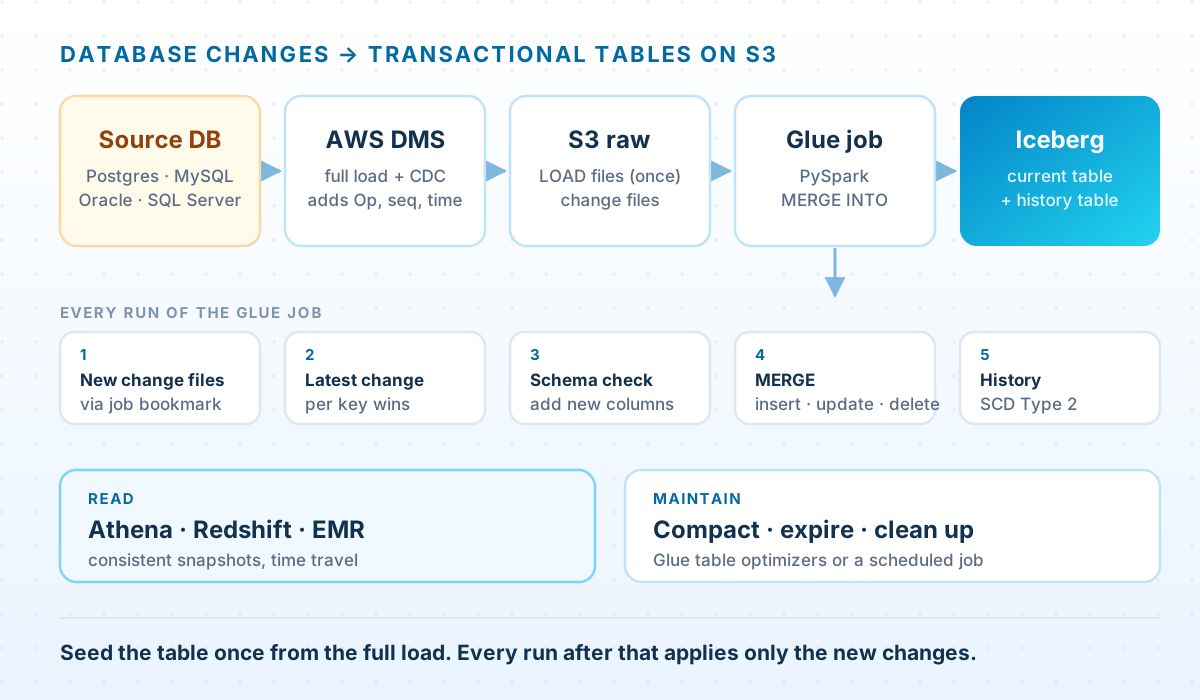
Four moving parts:
- AWS DMS reads the source database's change log and writes Parquet files to a raw S3 prefix: a one-off full load, then a continuous stream of change files.
- A seed job builds the Iceberg table from the full load, once.
- An incremental Glue job runs on a schedule, picks up the change files it hasn't seen yet using a job bookmark, and merges them into the table.
- Maintenance compacts files and expires old snapshots, through the Glue Data Catalog's automatic optimizers or a scheduled job.
The raw prefix stays as a log of every change. If the merge logic ever has a bug, you fix it and replay.
Get DMS to tell you the order
Every CDC pipeline lives or dies on one question: when two changes to the same row arrive in the same batch, which is newer? Get it wrong and the table quietly holds stale values, with nothing in the logs to say so.
By default, DMS puts an operation flag in the first column of every change record: I, U or D for insert, update and delete. That says what happened but not in what order. One endpoint setting and one table-mapping rule fix that:
{ "DataFormat": "parquet", "TimestampColumnName": "commit_ts" }DMS — table mapping rule that adds the change sequence to every row
{
  "rule-type": "transformation",
  "rule-id": "10",
  "rule-name": "add-change-sequence",
  "rule-target": "column",
  "object-locator": { "schema-name": "sales", "table-name": "%" },
  "rule-action": "add-column",
  "value": "change_seq",
  "expression": "$AR_H_CHANGE_SEQ",
  "data-type": { "type": "string", "length": 50 }
}commit_tsis the source commit time for change records. It's useful for history, but not a dependable sort key on its own: changes in one transaction share a commit time, and its precision depends on the source database.change_seqcomes from the$AR_H_CHANGE_SEQheader, a value that increases with every change DMS captures. The highest one for a key is its latest change, so this is the sort key.
For full-load rows, commit_ts is when DMS copied the row, not when it last changed, and change_seq is empty. A change committed while the full load was running can carry an earlier timestamp than the stale full-load copy of the same row, so sorting everything by timestamp lets old data win. The fix is structural: seed the table from the full load once, give those rows a sequence of zero, and let every real change outrank them.
Turning Iceberg on in Glue
Use Glue 5.0 or later. Glue 5.0 bundles Iceberg 1.7.1 and Glue 5.1 bundles 1.10.0, and both commit safely out of the box; Glue 3.0's Iceberg 0.13 needed a DynamoDB lock table to do that. Iceberg is enabled with job parameters:
Glue job parameters
{
  "--datalake-formats": "iceberg",
  "--conf": "spark.sql.extensions=org.apache.iceberg.spark.extensions.IcebergSparkSessionExtensions --conf spark.sql.catalog.glue_catalog=org.apache.iceberg.spark.SparkCatalog --conf spark.sql.catalog.glue_catalog.warehouse=s3://example-lake/warehouse/ --conf spark.sql.catalog.glue_catalog.catalog-impl=org.apache.iceberg.aws.glue.GlueCatalog --conf spark.sql.catalog.glue_catalog.io-impl=org.apache.iceberg.aws.s3.S3FileIO",
  "--job-bookmark-option": "job-bookmark-enable"
}
The --conf value is one long string. It registers the Glue Data Catalog as a Spark catalog named glue_catalog, so tables are addressed as glue_catalog.database.table from both the DataFrame API and Spark SQL.
Seed once from the full load
Seed job — build the Iceberg table from the DMS full load
# seed_customers.py: run once, after DMS finishes the full load.
# `spark` is the Glue job's Spark session (glue_context.spark_session).
from pyspark.sql import functions as F

TARGET = "glue_catalog.sales.customers"
RAW = "s3://example-raw/dms/sales/customers/"

full = spark.read.parquet(RAW + "LOAD*.parquet")         # full-load files only

(full
    # Full-load rows have no change sequence. Zero means "any real change beats this".
    .withColumn("_change_seq", F.lit(0).cast("decimal(38,0)"))
    .withColumn("_commit_ts", F.to_timestamp("commit_ts"))   # load time, not commit time
    .withColumn("_ingested_at", F.current_timestamp())
    .drop("change_seq", "commit_ts")
    .writeTo(TARGET)
    .partitionedBy(F.bucket(16, "customer_id"))
    .tableProperty("format-version", "2")
    .tableProperty("write.merge.mode", "merge-on-read")
    .tableProperty("write.update.mode", "merge-on-read")
    .tableProperty("write.delete.mode", "merge-on-read")
    .create())
Three choices in that table definition matter later:
bucket(16, customer_id)spreads the table across sixteen partitions by key, so a MERGE only touches the buckets its keys fall into instead of the whole table. Size the bucket count to the table: a handful of full-size files per bucket is a reasonable start.- Merge-on-read for merges, updates and deletes. Changes are recorded in small delete files instead of rewritten data files, which keeps frequent CDC runs cheap; reads pay a little extra until compaction applies them. Iceberg's default, copy-on-write, suits tables that are read far more often than they change.
- Three bookkeeping columns.
_change_seqmakes reruns safe,_commit_tsrecords when the source changed, and_ingested_atrecords when the lake found out.
The MERGE that actually works
The incremental job does three things in order: collapse the batch to one change per key, check the schema, and merge.
Incremental job — apply new change files with MERGE INTO
# customers_cdc.py: apply new DMS change files to the Iceberg table.
import sys
from awsglue.context import GlueContext
from awsglue.job import Job
from awsglue.utils import getResolvedOptions
from pyspark.context import SparkContext
from pyspark.sql import Window, functions as F

args = getResolvedOptions(sys.argv, ["JOB_NAME", "RAW_PATH"])
glue = GlueContext(SparkContext.getOrCreate())
spark = glue.spark_session
job = Job(glue)
job.init(args["JOB_NAME"], args)

TARGET = "glue_catalog.sales.customers"
KEY = "customer_id"


def evolve_schema(table, incoming, ignore=("Op",)):
    """Add columns that appeared at the source. Refuse anything riskier."""
    current = {f.name: f.dataType for f in spark.table(table).schema}
    for f in incoming.schema:
        if f.name in ignore:
            continue
        if f.name not in current:
            spark.sql(f"ALTER TABLE {table} ADD COLUMNS (`{f.name}` {f.dataType.simpleString()})")
        elif f.dataType != current[f.name]:
            raise ValueError(f"{table}.{f.name} changed type: "
                             f"{current[f.name].simpleString()} -> {f.dataType.simpleString()}")


# Only files this job hasn't processed yet (job bookmark), never the full-load files.
cdc = glue.create_dynamic_frame.from_options(
    connection_type="s3",
    connection_options={"paths": [args["RAW_PATH"]], "recurse": True,
                        "exclusions": '["**LOAD*.parquet"]'},
    format="parquet",
    transformation_ctx="customers_cdc",
).toDF()

if not cdc.isEmpty():
    # 1. One row per key: the change with the highest sequence number wins.
    latest = (
        cdc.withColumn("_change_seq", F.col("change_seq").cast("decimal(38,0)"))
           .withColumn("_commit_ts", F.to_timestamp("commit_ts"))
           .withColumn("_rn", F.row_number().over(
               Window.partitionBy(KEY).orderBy(F.col("_change_seq").desc())))
           .filter("_rn = 1")
           .drop("_rn", "change_seq", "commit_ts")
    )

    # 2. New source columns are added; type changes stop the job.
    evolve_schema(TARGET, latest)

    # 3. Inserts, updates and deletes in one atomic commit.
    latest.createOrReplaceTempView("changes")
    cols = [c for c in spark.table(TARGET).columns if c in latest.columns]
    set_list = ", ".join(f"t.{c} = s.{c}" for c in cols if c != KEY)
    col_list = ", ".join(cols)
    val_list = ", ".join(f"s.{c}" for c in cols)

    spark.sql(f"""
        MERGE INTO {TARGET} t
        USING changes s
        ON t.{KEY} = s.{KEY}
        WHEN MATCHED AND s._change_seq > t._change_seq AND s.Op = 'D' THEN DELETE
        WHEN MATCHED AND s._change_seq > t._change_seq THEN
          UPDATE SET {set_list}, t._ingested_at = current_timestamp()
        WHEN NOT MATCHED AND s.Op <> 'D' THEN
          INSERT ({col_list}, _ingested_at) VALUES ({val_list}, current_timestamp())
    """)

job.commit()   # the bookmark only moves forward once the MERGE has committed
Each part is there for a reason:
- Collapse first. A batch often holds several changes to one row, say an insert and two updates a few minutes apart. Spark refuses a MERGE in which more than one source row matches the same target row, and even if it didn't, it couldn't know which to apply. Keep only the highest sequence per key.
- Compare sequences inside the MERGE.
s._change_seq > t._change_seqapplies a change only if it's newer than what the table already holds. Reprocessing a batch after a failure, or replaying the whole raw log, leaves the table exactly as it was. - Commit the bookmark last.
job.commit()runs only after the MERGE succeeds. If the job dies halfway, the next run sees the same files again, and the sequence check makes that harmless.
A deleted row leaves nothing behind to compare against, so a change that arrives after its row was deleted, carrying an older sequence, would bring the row back. DMS writes changes in order and the bookmark reads them in order, so that doesn't happen in the pipeline above. If your changes can arrive late (from several sources, or replayed out of order), keep a soft-delete flag instead of deleting rows.
Schema drift
Sooner or later someone adds a column to the source table. DMS carries several kinds of DDL through to its S3 output, including added, dropped and renamed columns and type changes, so the change files can change shape without warning. Iceberg handles schema evolution well, because it tracks columns by ID rather than by name or position, but that doesn't mean every change should be applied automatically.
The evolve_schema function in the job draws a deliberately narrow line:
- New column: added to the table automatically, and existing rows read it as null. This is the common case, and it's safe.
- Changed type: the job stops. Iceberg can widen some types in place, such as int to long, but whether a change is safe for everyone downstream is a decision, not a default.
- Dropped column: the MERGE only updates columns present in the batch, so that column simply stops changing. Removing it from the table is a separate, deliberate step.
Keeping history: SCD Type 2
The current table answers “what is true now?” Sooner or later someone asks a different question: what did this customer's record say in March, when the invoice went out? That needs a history table with one row per version, in the slowly changing dimension Type 2 layout: valid_from, valid_to and an is_current flag. Seed it from the full load the same way as the current table, then maintain it from the same batch:
Incremental job, continued — SCD Type 2 history
# After the MERGE above, in the same job, from the same `changes` view.
HIST = "glue_catalog.sales.customers_history"
ATTRS = ["email", "full_name", "country", "status"]
attr_cols = ", ".join(ATTRS)
attr_vals = ", ".join("s." + a for a in ATTRS)

# Only changes the history doesn't already hold, so a rerun is a no-op.
spark.sql(f"""
    CREATE OR REPLACE TEMP VIEW fresh AS
    SELECT c.* FROM changes c
    LEFT JOIN {HIST} h ON h.customer_id = c.customer_id AND h.is_current
    WHERE h.customer_id IS NULL OR c._change_seq > h._change_seq
""")

spark.sql(f"""
    MERGE INTO {HIST} h
    USING (
      SELECT customer_id AS merge_key, * FROM fresh            -- closes the current version
      UNION ALL
      SELECT NULL AS merge_key, * FROM fresh WHERE Op <> 'D'   -- opens the new one
    ) s
    ON h.customer_id = s.merge_key AND h.is_current
    WHEN MATCHED THEN
      UPDATE SET h.is_current = false, h.valid_to = s._commit_ts
    WHEN NOT MATCHED AND s.merge_key IS NULL THEN
      INSERT (customer_id, {attr_cols}, valid_from, valid_to, is_current, _change_seq)
      VALUES (s.customer_id, {attr_vals}, s._commit_ts, NULL, true, s._change_seq)
""")
The trick is the UNION ALL. Each change appears twice in the merge source: once keyed on its customer_id, which matches the current version and closes it, and once with a null key, which can never match and so inserts the new version. Deletes only close. The fresh view drops changes the history already holds, which makes reruns harmless here too.
Because the batch was collapsed to one change per key, a row updated three times between runs gets one new version, not three. For most reporting that's what you want. If you need every intermediate state, for an audit trail say, build the history from the raw change files in sequence order instead of from the collapsed batch.
The maintenance you now own
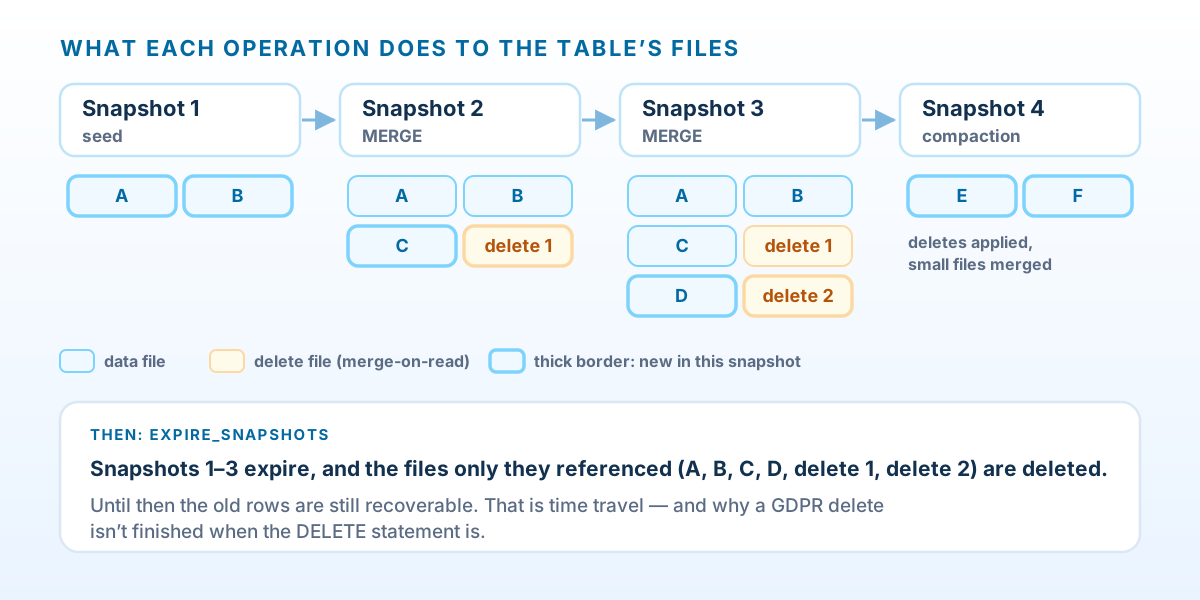
Every commit adds files and a snapshot, and nothing removes them by itself. A table merged every hour accumulates small data files, delete files and thousands of snapshots, and queries slow down as it does. Three operations keep it healthy:
- Compaction (
rewrite_data_files) merges small files into larger ones, applying any pending deletes to the files it rewrites. - Snapshot expiry (
expire_snapshots) drops old snapshots and deletes the files that only they referenced. This is what actually frees storage. - Orphan cleanup (
remove_orphan_files) deletes files that were written but never committed, usually by a job that failed midway.
The low-effort option is to let the Glue Data Catalog do all three: its table optimizers run compaction, snapshot retention and orphan file deletion for a table or for the whole catalog. Two rules matter if you do. Never let two tables share an S3 location, because one table's cleanup can delete files the other still needs. And keep Iceberg paths out of S3 lifecycle expiration rules, which delete files without knowing which ones a snapshot still references.
If you'd rather control timing yourself, the same operations are Spark procedures you can run from a scheduled Glue job:
Maintenance job — compaction, snapshot expiry, orphan cleanup
# maintain_customers.py: a scheduled Glue job, if you aren't using the catalog optimizers.
from datetime import datetime, timedelta, timezone

spark.conf.set("spark.sql.session.timeZone", "UTC")    # TIMESTAMP literals below are UTC
TABLE = "sales.customers"

# Merge small files into larger ones. Files it rewrites have their pending deletes applied.
spark.sql(f"CALL glue_catalog.system.rewrite_data_files(table => '{TABLE}')")

# Keep seven days of time travel, and never fewer than ten snapshots.
cutoff = (datetime.now(timezone.utc) - timedelta(days=7)).strftime("%Y-%m-%d %H:%M:%S")
spark.sql(f"""
    CALL glue_catalog.system.expire_snapshots(
      table => '{TABLE}', older_than => TIMESTAMP '{cutoff}', retain_last => 10)
""")

# Files written by failed jobs and never committed. Keep the default three-day
# window: anything newer might belong to a write that is still in progress.
spark.sql(f"CALL glue_catalog.system.remove_orphan_files(table => '{TABLE}')")
Snapshot retention is also your time-travel window. Seven days means you can see, or roll back, anything the last week's runs did:
-- Athena: the table as it was 24 hours ago, before last night's run
SELECT * FROM sales.customers FOR TIMESTAMP AS OF (current_timestamp - interval '1' day)
WHERE customer_id = 42;
For questions that reach further back than the retention window, use the history table. Time travel is for “what did last night's run change?”; history is for “what was true in March?”
Deletes that really delete
Time travel and the right to erasure pull in opposite directions. After DELETE FROM customers WHERE customer_id = 42, the customer is gone from the current table, but:
- in a merge-on-read table, the delete only wrote a delete file, and the data file still holds the row;
- every older snapshot still references files containing the row, and anyone with access can time-travel to them;
- the raw DMS change files hold every version of the row that was ever captured.
A purge has to deal with all three:
Purge — erase a customer from the current table and its snapshots
from datetime import datetime, timezone


def purge_customer(spark, customer_id):
    """Erase one customer from the current table, including from old snapshots."""
    cid = int(customer_id)                       # never interpolate unchecked input into SQL
    spark.conf.set("spark.sql.session.timeZone", "UTC")

    # 1. Remove the row from the current state. Merge-on-read writes a delete file.
    spark.sql(f"DELETE FROM glue_catalog.sales.customers WHERE customer_id = {cid}")

    # 2. Rewrite the data files that still physically contain the row.
    spark.sql(f"""
        CALL glue_catalog.system.rewrite_data_files(
          table => 'sales.customers',
          where => 'customer_id = {cid}',
          options => map('delete-file-threshold', '1'))
    """)

    # 3. Expire every older snapshot, which deletes the files that held the row.
    now = datetime.now(timezone.utc).strftime("%Y-%m-%d %H:%M:%S")
    spark.sql(f"""
        CALL glue_catalog.system.expire_snapshots(
          table => 'sales.customers', older_than => TIMESTAMP '{now}', retain_last => 1)
    """)
Note the delete-file-threshold option. By default, compaction doesn't rewrite a data file just because it has deletes against it, so without that option the row survives compaction. Expiring every snapshot but the newest also gives up time travel for the whole table, so purges are best batched (weekly, say) rather than run one request at a time. Then do the same for the history table, and put a lifecycle rule on the raw DMS prefix so change files age out on a schedule your retention policy can defend.
When not to use Iceberg
- Small tables. A reference table with a few hundred thousand rows is simpler and often cheaper to overwrite completely on each run. MERGE earns its keep when the table is large and the changes are small.
- Data that only grows. Clickstream and logs that never change gain safer commits and time travel, but little else. Well-partitioned Parquet is fine.
- Changes needed within seconds. Each batch is a commit and a snapshot. Running every few seconds produces a mountain of tiny files and snapshots; if the business needs changes visible that quickly, that's a streaming design, not a faster schedule.
- Nobody owns maintenance. A table without compaction and snapshot expiry gets slower and more expensive every week. Turn the optimizers on before you go live, not after the first complaint.
Questions we get asked
Iceberg, Delta Lake or Hudi?
All three support upserts on S3, and Glue supports all three natively. On AWS we default to Iceberg because it has the deepest integration across AWS services: Athena can both read and write it, and the Glue Data Catalog can maintain it for you.
Do we have to use DMS?
No. If your source already publishes change events, through Debezium and Kafka for example, the pattern is the same: collapse each batch to the latest change per key, then MERGE with a sequence check. Only the column you order by changes.
Merge-on-read or copy-on-write?
Merge-on-read for tables that change often in small batches, such as CDC targets: writes stay cheap, and compaction tidies up behind them. Copy-on-write for tables that change rarely and are read heavily, where it's worth paying at write time so every read is as fast as possible.
How often should the job run?
As often as the people using the data need, and no more. We usually start hourly and tighten only when someone has a real reason. Every run creates a snapshot and new files, so frequency and maintenance have to be planned together.
Can Athena query these tables directly?
Yes. Iceberg tables registered in the Glue Data Catalog are queryable from Athena, including time travel, with no extra setup.
Is your lake still rewriting partitions to change a row?
We'll review your pipelines and storage layout and show you where transactional tables would cut cost and risk — and where plain Parquet is still the right call.
Book a data lake assessment