
Six months after launch, someone in marketing asks a reasonable question: which of our service pages mention healthcare? Nobody can answer it. “Healthcare” appears in forty places, all of them inside rich-text fields, half of them in a block called Blue Hero (v2). The site looks great. The content is a pile.
That project didn't fail on the front end. It failed in the content model, months earlier, in decisions that seemed too small to argue about.
In our last CMS article we made the case for going headless. This is the part that decides whether it pays off.
The model is the product
Contentful gives you an empty database and a good editor. Everything that makes it your CMS comes from the content model: the content types, their fields, and how they reference each other.
That model does more work than it appears to. The editing screens your team uses every day are generated from it. The shape of every API response is derived from it. Every query your front end makes, every filter on your site and every future channel you feed inherits its strengths and its mistakes. You can redesign a front end in a quarter. Remodeling content that thousands of entries already depend on is a migration project.
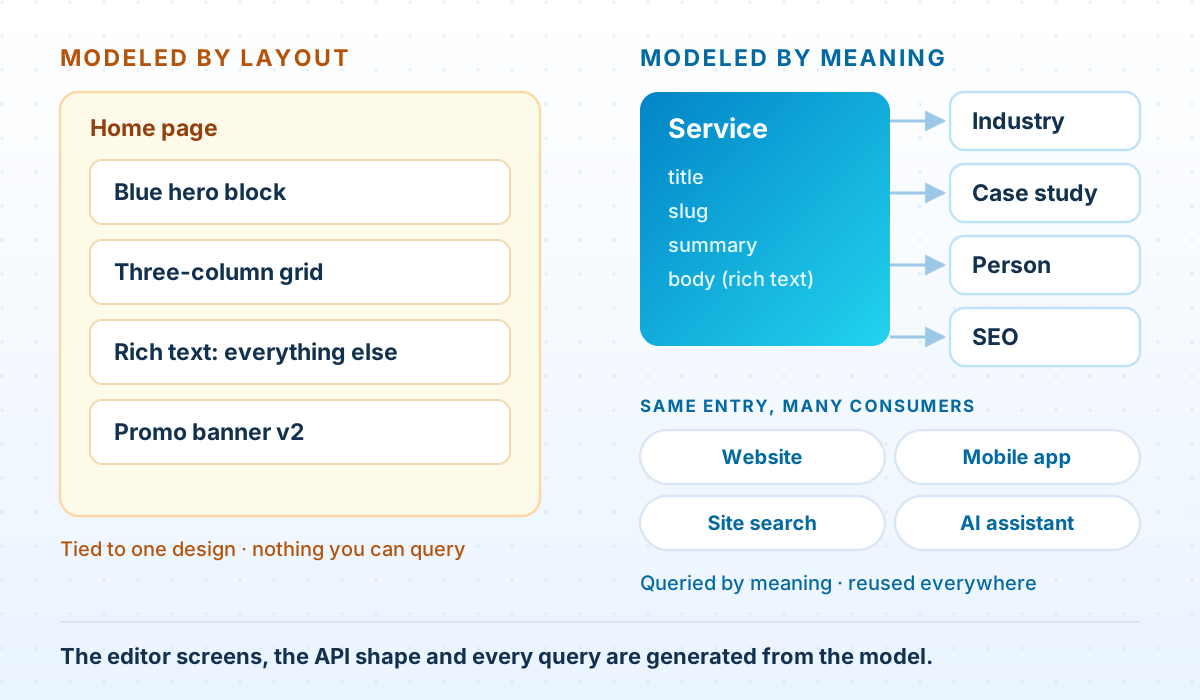
Model meaning, not layout
The most common mistake is designing content types from the page mockups. The design file has a blue hero, a three-column grid and a promo banner, so the space gets content types called Blue Hero, Three Column Grid and Promo Banner. It feels efficient. It ties every piece of content to one visual design, and it's the first thing that breaks in a redesign.
Name content types after what things are, and let the front end decide how they look:
| Modeled by layout | Modeled by meaning |
|---|---|
| Blue Hero Block | Service, with a summary field the hero renders |
| Three Column Grid | A list of references to Case Study entries |
| Team Member Card | Person: name, role, photo, bio |
| Footer Address Block | Office: city, country, address |
| Promo Banner v2 | Campaign, with start and end dates |
The test is simple: if a redesign would make you rename the content type, it's named after layout.
You still need some composition. A campaign landing page that marketing assembles from sections is a legitimate content type. The rule is that sections reference meaningful content rather than contain it. A Case study grid section that points at three Case Study entries is fine. One with three hand-typed case-study summaries inside it is how the same story ends up in four places, three of them out of date.
The one-big-rich-text-field trap
Rich text is for prose. The trap is letting it become the place where everything goes, because it's the one field that never says no.
A useful rule: if anyone will ever ask “show me every X where Y”, Y needs to be its own field. The industry a service applies to, the price on a plan, the date an offer ends, the author of an article: none of those belong in a paragraph. In a paragraph they can't be filtered, sorted, validated, reused or translated on their own.
Rich text is still the right tool for the body of an article, and Contentful lets you embed entries inside it, so a product card or a callout in the middle of a post can be a real referenced entry rather than pasted text. The hard limits are generous (200,000 characters per rich-text field, 50 fields per content type), so you won't hit them by accident. A content type that gets close to 50 fields is usually several content types forced into one.
References: shallow and deliberate
References are what make a model reusable, and they're also where performance quietly goes. When the front end asks the Delivery API for entries, it can resolve linked entries in the same response with the include parameter. The default is one level; the maximum is ten.
curl -s "https://cdn.contentful.com/spaces/$SPACE_ID/environments/master/entries?content_type=service&fields.slug=data-engineering&include=3" \
  -H "Authorization: Bearer $CDA_TOKEN"
Needing ten levels is a warning sign, not a feature. Deep reference chains (page → section → grid → card → service → industry → icon) usually mean the model is describing the layout tree. They also make responses heavy, and the Delivery API caps a single response at 7 MB. On most sites we build, a page needs three levels or fewer.
Two habits keep references under control:
- Restrict what each reference field accepts. A reference field without a content-type validation accepts any entry in the space, and over time editors will link to all of them. Say exactly which content types are allowed.
- Point, don't copy. If two services share an industry, they should both reference one Industry entry, not each carry their own copy of its description.
Validations are your style guide
Every rule in your editorial guidelines that a machine can check, a machine should check. Contentful validations run in the editor, before anything is published, which is the only place a style guide is reliably followed.
- Required on anything the front end can't render without.
- Size limits on titles, summaries and SEO fields. An SEO title capped at 60 characters gets written to fit.
- Unique on slugs, so two pages can't claim the same URL.
- A pattern on slugs, so nobody publishes
/Our Services!. - Accepted values for small fixed lists, and content-type restrictions on every reference.
Here is a Service type with those rules, written as a migration script rather than built by clicking. The next section explains why.
Migration — create the Service content type with validations
// migrations/0002-create-service.js
// industry and seoMetadata are created in 0001-create-taxonomy.js
module.exports = function (migration) {
  const service = migration.createContentType('service', {
    name: 'Service',
    description: 'A service we sell. One entry per service, reused everywhere it appears.',
  });

  service.createField('title', {
    name: 'Title', type: 'Symbol', required: true,
    validations: [{ size: { max: 80 } }],
  });
  service.displayField('title');

  service.createField('slug', {
    name: 'Slug', type: 'Symbol', required: true,
    validations: [
      { unique: true },
      { regexp: { pattern: '^[a-z0-9]+(-[a-z0-9]+)*$' },
        message: 'Lowercase words separated by hyphens, e.g. data-engineering' },
    ],
  });

  service.createField('summary', {
    name: 'Summary', type: 'Text', required: true,
    validations: [{ size: { max: 300 } }],
  });

  service.createField('body', { name: 'Body', type: 'RichText' });

  service.createField('industries', {
    name: 'Industries', type: 'Array',
    items: { type: 'Link', linkType: 'Entry',
             validations: [{ linkContentType: ['industry'] }] },
  });

  service.createField('seo', {
    name: 'SEO', type: 'Link', linkType: 'Entry',
    validations: [{ linkContentType: ['seoMetadata'] }],
  });
};
Taxonomy is content too
Industries, topics, regions and audiences are tempting to model as free-text fields. For anything that drives navigation or filtering on the site, model them as their own content types instead. An Industry entry can carry a name, a slug, a description and an icon; it gets its own landing page almost for free; and renaming it is one edit instead of a find-and-replace across every entry that mentions it.
Contentful's tags are still useful, but for internal organization: which entries belong to a campaign, a team or a review cycle. A good rule of thumb: if visitors see it, it's a content type; if only editors see it, it can be a tag.
Change the model with code, not clicks
Before launch, editing the model in the web app is fine. After launch, it's how production breaks. Rename a field ID in the UI and every front-end query that used the old one fails on the next build. Need a field to be a different type? Contentful won't change a field's type once it exists, so the real change is a new field, a copy of the data and a deleted old field, which is three steps to get right on a live site.
The contentful-migration library turns those changes into scripts that live in version control, get reviewed like any other code, and run the same way in every environment. Its most useful helpers do the data work, not just the schema work: transformEntries rewrites field values across every entry of a type, and deriveLinkedEntries turns a repeated value into entries of their own.
A common example: authors were typed into a text field, and now they need bios and photos. The fix is to create a Person entry for each distinct name and link to it:
Migration — turn a typed author name into a linked Person entry
// migrations/0007-author-to-person.js
// Authors were typed into a text field. Create one Person entry per distinct
// name and link to it, so a bio and photo live in exactly one place.
module.exports = function (migration) {
  migration.editContentType('article').createField('authorRef', {
    name: 'Author', type: 'Link', linkType: 'Entry',
    validations: [{ linkContentType: ['person'] }],
  });

  migration.deriveLinkedEntries({
    contentType: 'article',
    derivedContentType: 'person',
    from: ['author'],
    toReferenceField: 'authorRef',
    derivedFields: ['name'],
    // The same name always produces the same Person ID, so two articles by
    // one author end up linked to one entry.
    identityKey: async (fromFields) =>
      (fromFields.author?.['en-US'] ?? 'unknown')
        .trim().toLowerCase().replace(/[^a-z0-9]+/g, '-'),
    deriveEntryForLocale: async (fromFields, locale) => {
      if (locale !== 'en-US') return;          // names are not localized
      return { name: fromFields.author?.[locale]?.trim() ?? 'Unknown' };
    },
    shouldPublish: true,
  });

  // The old `author` field stays for now. It is deleted in a later migration,
  // after the front end has shipped reading `authorRef`.
};Notice that the old author field is left in place. Add the new field, migrate the data, ship the front end that reads it, and only then delete the old field in a later migration. Each step is safe to deploy on its own, and none of them needs the website and the model to change at the same moment.
Release the model like you release code
Migration scripts need somewhere safe to run. A Contentful environment is a full copy of a space's model and content, and an environment alias lets a stable name, usually master, point at whichever environment is currently live. Together they give you a release process for content structure:
- Clone the live environment into a dated one.
- Run the new migrations there.
- Point a preview build of the website at it and test.
- Switch the
masteralias to the new environment. The website, which only ever asks formaster, picks it up with no deploy.
Contentful CLI — clone, migrate, release, roll back
# 1. Clone the live model and content into a dated environment
contentful space environment create --space-id "$SPACE_ID" \
  --environment-id master-2026-06-16 --name "Release 2026-06-16" \
  --source master --await-processing

# 2. Apply the new migration scripts there, in order
for f in migrations/pending/*.js; do
  contentful space migration --space-id "$SPACE_ID" \
    --environment-id master-2026-06-16 --yes "$f"
done

# 3. Point a preview build of the site at master-2026-06-16 and test it.
# 4. Release: move the alias. The site only ever asks for "master".
contentful space environment-alias update --space-id "$SPACE_ID" \
  --alias-id master --target-environment-id master-2026-06-16

# Rollback is the same command, pointed at the previous environment.An environment is a copy, not a branch. Anything editors publish in the old environment after you clone it will not be in the new one when the alias switches. Keep the window short (clone, migrate, test and switch on the same day) or agree a brief publishing freeze. This is the step teams forget, and the symptom is an editor asking where yesterday's change went.
Contentful doesn't record which migration scripts have already run against an environment, so the release process has to. A common approach is to store the number of the last applied migration in a small entry in the space and have CI run only the scripts after it. Environment and alias limits vary by plan, so check yours before designing a release process around them.
A modeling checklist
- Every content type is named after what it is, not how it looks.
- Anything someone will filter, sort, reuse or translate on its own is its own field.
- Every reference field restricts the content types it accepts.
- Pages resolve with three levels of
includeor fewer. - Slugs are required, unique and pattern-checked.
- Taxonomy that visitors see is modeled as content types; tags are for internal use.
- Every model change since launch exists as a migration script in version control.
- Releases go through a cloned environment and an alias switch.
- One named person owns the model, and both marketing and engineering know to bring changes to them.
Questions we get asked
How many content types should we have?
Fewer than you think, and more than one. A typical marketing site lands in the tens, not the hundreds. Contentful's technical limit is 1,000 per environment; treat that as a ceiling, not a target. If you're creating a new content type for every page design, that's the layout trap again.
Can we change the model after launch?
Yes, and you will. The safe way is migration scripts run in a cloned environment and released by switching the alias, with any destructive change split into expand-then-contract steps.
Should every page be a flexible “Page” built from sections?
For campaign landing pages that marketing assembles, yes. For things with a real structure (services, products, people, locations), no. Model those as their own content types so they can be queried and reused.
Who should own the content model?
One named person, usually on the engineering side, who takes requests from both marketing and development. Models without an owner drift: every team adds the field it needs and nobody removes the ones that are no longer used.
Does this only apply to Contentful?
No. The modeling principles apply to any structured headless CMS. The specific tools here (environments, aliases and the migration library) are Contentful's.
Want a second opinion on your content model?
We'll review your Contentful space — content types, references, validations and how changes reach production — and tell you what will start to hurt in a year, and what to change now.
Request a content model review