
Take one table and store it twice, once as CSV and once as Parquet. Run the same query against both, say total revenue by country for one day. One copy has to read 1.7 gigabytes. The other reads under 4 megabytes. Athena bills by the byte it scans.
Those numbers aren't from a vendor slide. They come from a test we ran for this article, and the script is below so you can run it yourself. They also show something most teams miss: converting to Parquet gets you the first big saving, and how you write the Parquet decides whether you get the second, much larger one.
Same data, five layouts
The test table has 10 million rows of synthetic clickstream data: 16 columns covering a month of events. We wrote it five ways and asked how many bytes one typical query must read: revenue by country for 15 September, which touches 3 columns and 1 of 30 days.
Results
Layout                                   File size  Read by query   vs CSV
CSV                                       1707.3 MB      1707.3 MB       1x
CSV, gzip                                  381.0 MB       381.0 MB       4x
Parquet, Snappy, unsorted                  398.7 MB        87.3 MB      20x
Parquet, Snappy, sorted by event_ts        365.4 MB         4.2 MB     408x
Parquet, ZSTD, sorted by event_ts          309.2 MB         3.8 MB     451x
For Parquet, “read by query” is calculated from each file's own metadata: the compressed size of the three columns the query needs, in the row groups whose statistics say they could contain 15 September. That's what a Parquet-aware engine such as Athena reads, give or take the footer. We checked that reading only those row groups returns exactly the same answer as reading everything. A CSV file has no such metadata, so it's read in full.
parquet_vs_csv.py — the benchmark, reproducible with pyarrow and numpy
About 90 seconds and 3 GB of disk on a laptop. The data is random, so it compresses worse than real data usually does; the effects of skipping columns and row groups don't depend on that.
# parquet_vs_csv.py: one table, five layouts, and the bytes one query has to read from each.
# Query: total revenue by country for a single day (3 of 16 columns, 1 of 30 days).
import gzip
import os
import shutil
from datetime import datetime, timedelta

import numpy as np
import pyarrow as pa
import pyarrow.compute as pc
import pyarrow.csv as pacsv
import pyarrow.parquet as pq

N, DAYS, RG_ROWS = 10_000_000, 30, 500_000
OUT = "data"
rng = np.random.default_rng(42)
start = datetime(2026, 9, 1)


def pick(values, p=None):
    """A low-cardinality string column, like most real dimension columns."""
    idx = rng.choice(len(values), size=N, p=p)
    return pc.take(pa.array(values), pa.array(idx))


seconds = rng.integers(0, DAYS * 86_400, N)
table = pa.table({
    "event_id":    pa.array(np.arange(N, dtype=np.int64)),
    "event_ts":    pa.array(np.datetime64(start, "us") + seconds.astype("timedelta64[s]")),
    "customer_id": pa.array(rng.integers(1, 2_000_000, N)),
    "country":     pick([f"C{i:02d}" for i in range(30)]),
    "device":      pick(["desktop", "mobile", "tablet", "tv"], [0.5, 0.42, 0.07, 0.01]),
    "browser":     pick(["chrome", "safari", "edge", "firefox", "samsung", "other"]),
    "page":        pick([f"/products/item-{i}" for i in range(200)]),
    "referrer":    pick([f"https://ref{i}.example.com/" for i in range(50)]),
    "campaign":    pick([f"campaign-{i}" for i in range(100)]),
    "event_type":  pick(["view", "click", "add_to_cart", "purchase"], [0.7, 0.2, 0.07, 0.03]),
    "quantity":    pa.array(rng.integers(0, 5, N)),
    "revenue":     pa.array(np.round(rng.exponential(40, N) * (rng.random(N) < 0.03), 2)),
    "duration_ms": pa.array(rng.integers(50, 120_000, N)),
    "is_bot":      pa.array(rng.random(N) < 0.02),
    "latitude":    pa.array(np.round(rng.uniform(-60, 70, N), 4)),
    "longitude":   pa.array(np.round(rng.uniform(-180, 180, N), 4)),
})

QUERY_COLS = ["event_ts", "country", "revenue"]
DAY_FROM, DAY_TO = datetime(2026, 9, 15), datetime(2026, 9, 16)


def bytes_to_read(path):
    """What a Parquet-aware engine reads: only the needed columns, only the
    row groups whose min/max for event_ts overlap the day we asked for."""
    md, total = pq.ParquetFile(path).metadata, 0
    for i in range(md.num_row_groups):
        rg = md.row_group(i)
        col = {rg.column(j).path_in_schema: rg.column(j) for j in range(rg.num_columns)}
        st = col["event_ts"].statistics
        if st is not None and st.has_min_max and (st.max < DAY_FROM or st.min >= DAY_TO):
            continue
        total += sum(col[c].total_compressed_size for c in QUERY_COLS)
    return total


os.makedirs(OUT, exist_ok=True)
results = []

pacsv.write_csv(table, f"{OUT}/events.csv")
size = os.path.getsize(f"{OUT}/events.csv")
results.append(("CSV", size, size))                              # a CSV has to be read in full

with open(f"{OUT}/events.csv", "rb") as src, gzip.open(f"{OUT}/events.csv.gz", "wb") as dst:
    shutil.copyfileobj(src, dst)
size = os.path.getsize(f"{OUT}/events.csv.gz")
results.append(("CSV, gzip", size, size))

for label, data, codec in [
    ("Parquet, Snappy, unsorted", table, "snappy"),
    ("Parquet, Snappy, sorted by event_ts", table.sort_by("event_ts"), "snappy"),
    ("Parquet, ZSTD, sorted by event_ts", table.sort_by("event_ts"), "zstd"),
]:
    path = f"{OUT}/{label.replace(', ', '-').replace(' ', '_')}.parquet"
    pq.write_table(data, path, compression=codec, row_group_size=RG_ROWS)
    results.append((label, os.path.getsize(path), bytes_to_read(path)))

csv_bytes = results[0][1]
print(f"{'Layout':38} {'File size':>11} {'Read by query':>14} {'vs CSV':>8}")
for label, size, read in results:
    print(f"{label:38} {size / 1e6:9.1f} MB {read / 1e6:11.1f} MB {csv_bytes / read:7.0f}x")
Three things stand out:
- Compression alone is a modest win. Gzipped CSV is 4× smaller, and the query still reads all of it.
- Columnar storage is the big step. Unsorted Parquet is actually slightly larger than gzipped CSV, yet the query reads 20× less than plain CSV, because it reads only 3 of 16 columns.
- Sorting is the step most people miss. The same Parquet, sorted by time, reads about 400× less than CSV. The difference between the third and fourth rows is just the order of the rows.
In money: at Athena's on-demand rate of $5 per terabyte scanned, running that query 1,000 times a day for a month costs about $256 against the CSV, $57 against gzipped CSV, $13 against unsorted Parquet, and under $1 against sorted Parquet. Same data, same SQL, same answer.
Rows versus columns
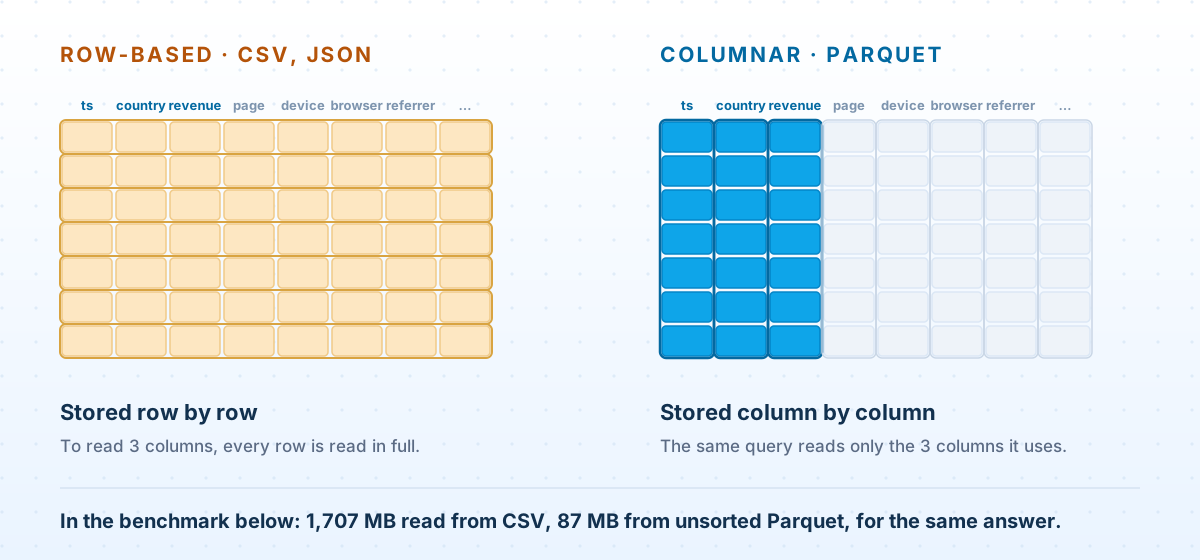
A CSV stores a table the way you'd write it out by hand: one row after another, every column of each row together. To get three columns out, a reader has to go through every byte of every row, because the values it wants are interleaved with everything it doesn't.
Parquet turns that around and stores all the values of a column together. A query that needs event_ts, country and revenue reads those three runs of data and ignores the other thirteen. Analytical queries almost always touch a handful of columns out of many, which is why this alone accounts for the 20× in the benchmark.
Inside a Parquet file
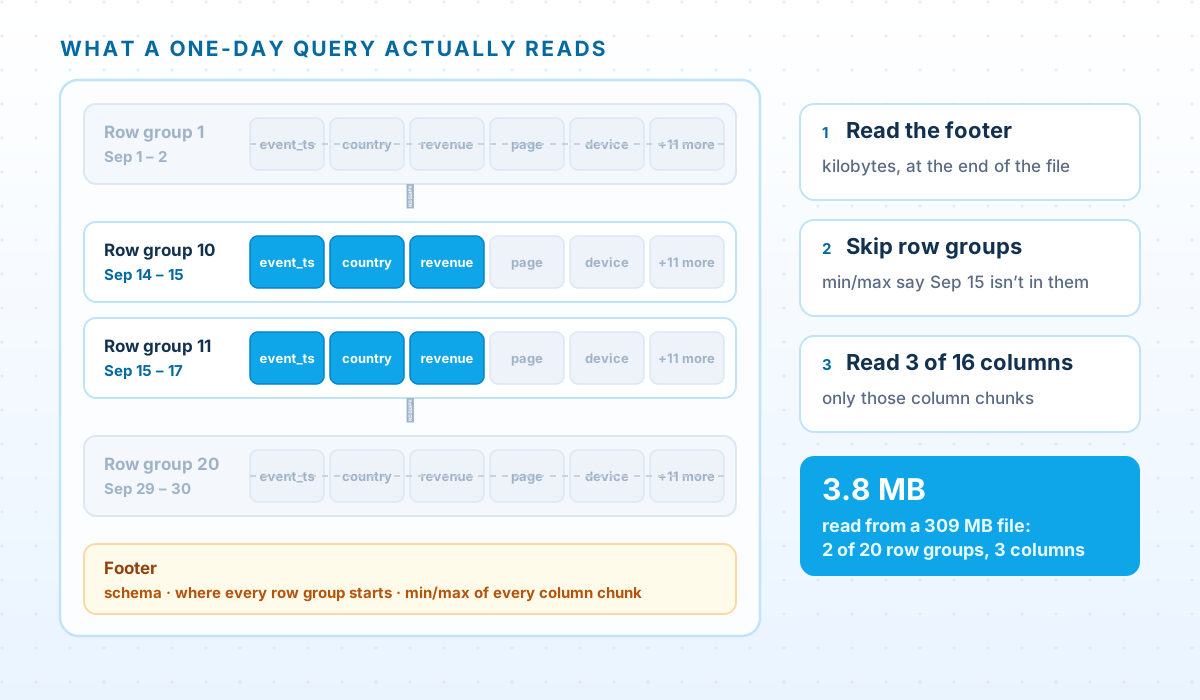
A Parquet file has four layers:
- Row groups split the rows horizontally, for example 500,000 rows each. They're the unit engines split work by, so one large file can still be read in parallel.
- Column chunks hold one column's values within one row group. They're what a reader actually fetches.
- Pages divide each column chunk further, and they're where encoding and compression are applied.
- The footer, written at the end of the file, records where every row group and column chunk starts, plus statistics for each column chunk, including its minimum and maximum value.
An engine reads the footer first. Before touching any data, it already knows which column chunks exist, where they are, and what range of values each one holds. Everything Parquet saves comes from acting on that knowledge.
Three ways a query skips work
- Skip columns. Read only the column chunks the query references. This needs nothing from you except not writing
SELECT *. - Skip row groups. Compare the query's filter with each row group's minimum and maximum. If 15 September can't be in a row group, its chunks aren't read at all.
- Skip files. With Hive-style partitioning, a day's data lives under its own S3 prefix, such as
event_date=2026-09-15/, and the engine never even lists the other days. Our pipeline guide covers choosing partition columns.
The first and third work almost automatically. The second depends entirely on how the data was written.
Unsorted Parquet skips almost nothing
Here's a short script that prints what an engine learns from the footer: each row group's size and the minimum and maximum of one column:
inspect_parquet.py — read a file's row-group statistics
# inspect_parquet.py: what a query engine knows before it reads a single row.
import sys
import pyarrow.parquet as pq

md = pq.ParquetFile(sys.argv[1]).metadata
print(f"{md.num_rows:,} rows, {md.num_row_groups} row groups, {md.num_columns} columns")
col = md.schema.names.index(sys.argv[2])                # e.g. event_ts
for i in range(md.num_row_groups):
    chunk = md.row_group(i).column(col)
    st = chunk.statistics
    print(f"row group {i:>2}: {chunk.total_compressed_size / 1e6:5.1f} MB  min={st.min}  max={st.max}")
Run it on the unsorted file from the benchmark:
Output — unsorted
$ python inspect_parquet.py data/Parquet-Snappy-unsorted.parquet event_ts
10,000,000 rows, 20 row groups, 16 columns
row group  0:   3.9 MB  min=2026-09-01 00:00:02  max=2026-09-30 23:59:54
row group  1:   3.9 MB  min=2026-09-01 00:00:00  max=2026-09-30 23:59:57
row group  2:   3.9 MB  min=2026-09-01 00:00:05  max=2026-09-30 23:59:59
row group  3:   3.9 MB  min=2026-09-01 00:00:00  max=2026-09-30 23:59:59
...
Every row group runs from 1 September to 30 September, because the rows were written in no particular order. The statistics are correct and completely useless: no row group can be ruled out for any day, so all 20 are read. Now the sorted file:
Output — sorted by event_ts
$ python inspect_parquet.py data/Parquet-Snappy-sorted_by_event_ts.parquet event_ts
10,000,000 rows, 20 row groups, 16 columns
row group  0:   1.6 MB  min=2026-09-01 00:00:00  max=2026-09-02 11:59:12
row group  1:   1.6 MB  min=2026-09-02 11:59:12  max=2026-09-04 00:03:16
row group  2:   1.6 MB  min=2026-09-04 00:03:17  max=2026-09-05 11:59:39
row group  3:   1.6 MB  min=2026-09-05 11:59:39  max=2026-09-06 23:59:05
...
Each row group now covers about a day and a half, so a query for 15 September reads two of the twenty. One of those two is read only because it starts at 23:55 on the 15th, which shows how literal the rule is: a row group is skipped only when its range rules it out completely.
Sort by what you filter on most, after the partition column. If every query filters by date and the table is partitioned by date, sort within each day by the next most common filter, such as customer_id or country. If your data lives in Iceberg tables, Athena can go a level deeper, using page-level column indexes to skip parts of a row group too. In AWS's own test, sorting alone reduced bytes scanned by 38.5%, and sorting plus column indexes by 71.2%. As the Iceberg article explains, it's the same data underneath.
Encoding first, compression second
Before any compression codec runs, Parquet encodes each column in a way that suits its values. The most important is dictionary encoding: a column with a few hundred distinct values, such as page paths or country codes, is stored as a small dictionary plus a compact integer reference for each row. Runs of repeated values are then stored with run-length encoding.
In the benchmark data, with compression switched off entirely, dictionary encoding shrinks the page column from 214.5 MB to 10.1 MB, and country from 70.0 MB to 6.3 MB. Writers apply it automatically, which is a large part of why Parquet is small even before a codec is involved.
Compression is then applied page by page. Three codecs come up in practice:
- Snappy is Spark's default: fast to decompress, with moderate compression.
- ZSTD compresses better for a little more CPU. In the benchmark it made the sorted file 15% smaller than Snappy (309 MB vs 365 MB). It's our default for data that's written once and read often.
- GZIP is what Athena uses for Parquet in
CREATE TABLE ASunless you choose otherwise. It compresses well but decompresses more slowly.
You'll sometimes read that Snappy beats Gzip for Parquet because Snappy is “splittable”. For Parquet that's a myth: compression is applied per page, and engines split work at row-group boundaries, so a Parquet file can be read in parallel whichever codec it uses. (Splittability does matter for whole-file compression: one large gzipped CSV is read by a single task.) Choose a Parquet codec on size and speed, not splittability.
Writing Parquet that engines can skip through
In Spark, the writer settings that matter fit in a few lines:
PySpark — partitioned by day, sorted within files, ZSTD
# Write Parquet that engines can skip through.
from pyspark.sql import functions as F

(events
    .withColumn("event_date", F.to_date("event_ts"))
    .repartition("event_date")                        # one writer per day...
    .sortWithinPartitions("country", "event_ts")      # ...each file sorted, so min/max ranges are narrow
    .write
    .mode("overwrite")
    .option("compression", "zstd")
    .option("maxRecordsPerFile", 5_000_000)           # caps file size on unusually large days
    .partitionBy("event_date")                        # one S3 prefix per day: skipped without reading
.parquet("s3://example-lake/curated/events/"))- Partition by the coarse filter (the date), so whole days are skipped without being listed.
- Sort within files by the next filter, so row-group statistics have narrow ranges.
- Keep files large. Spark's Parquet writer defaults to row groups of about 128 MB, and files much smaller than that bring back the small-file problem covered in the pipeline guide.
Converting CSV and JSON you already have
If the data is already in S3 as CSV or JSON with a table defined over it, Athena can convert it in one statement:
Athena — CREATE TABLE AS to Parquet
-- Convert a month of CSV to Parquet in one statement, partitioned by day.
CREATE TABLE analytics.events_parquet
WITH (
  format            = 'PARQUET',
  write_compression = 'ZSTD',            -- Athena's Parquet default is GZIP, so say so
  external_location = 's3://example-lake/curated/events/',
  partitioned_by    = ARRAY['event_date']
) AS
SELECT event_id, event_ts, customer_id, country, device, page, event_type, revenue,
       CAST(event_ts AS date) AS event_date            -- partition columns go last
FROM   analytics.events_csv
WHERE  event_ts >= TIMESTAMP '2026-09-01 00:00:00'
  AND  event_ts <  TIMESTAMP '2026-10-01 00:00:00';
Two practical limits: partition columns must come last in the SELECT, and a single CREATE TABLE AS query can write at most 100 partitions. For a longer history, create the table for the first range, then add the rest in batches with INSERT INTO. For data that keeps arriving, convert it in the ingestion job instead, so Parquet is written once at the start of the pipeline.
The economics are simple. The conversion scans the CSV once, which costs the same as one query against it. Every query after that is cheaper. For a table that's queried even a few times a day, it pays for itself almost immediately.
What Parquet doesn't do
- Update rows. Parquet files are written once. Changing a row means rewriting the file it's in. For data that changes, put a table format such as Iceberg on top; the Iceberg article covers how.
- Make tiny files efficient. Every file has a footer to fetch and parse. Thousands of small files cost more in overhead than they save.
- Rename columns safely on its own. Plain Parquet tables match columns by name, so renaming a column makes older files return nulls for it. Iceberg tracks columns by ID, which is one more reason to use it for tables that evolve.
- Serve row-by-row lookups. Fetching one record by key is a database's job. Parquet is built for scanning many rows across few columns.
A checklist
- Analytical data in S3 is Parquet, not CSV or JSON.
- Tables are partitioned by the coarse filter, usually date.
- Files are sorted within partitions by the next most common filter.
- Files and row groups are large, not thousands of small fragments.
- The codec is chosen deliberately: ZSTD or Snappy, not Athena's GZIP default by accident.
- Queries name their columns rather than using
SELECT *. - Bytes scanned per query is monitored, so a change that breaks skipping gets noticed.
Questions we get asked
Parquet or ORC?
Both are columnar formats with statistics that let engines skip data, and both work well with Athena. We default to Parquet because it's the most widely supported across Spark, Python tooling, Iceberg and the AWS analytics services. The bigger mistake is mixing formats without a reason.
Snappy or ZSTD?
Either is a sound choice. ZSTD produces smaller files for a little more CPU, and in our benchmark it was 15% smaller than Snappy. For data that's written once and read many times, smaller usually wins. Avoid ending up on GZIP by accident through Athena's CREATE TABLE AS default.
Does Parquet help with SELECT *?
Much less. Skipping columns only works when a query names a few of them. Compression and row-group skipping still help, but a dashboard that selects every column gives up the biggest saving Parquet offers.
How large should files be?
Large enough that the per-file overhead disappears: hundreds of megabytes per file, not hundreds of kilobytes. Spark's writer defaults to row groups of about 128 MB. Thousands of tiny files are a common reason Parquet tables underperform.
Should we convert all our historical data?
Convert what gets queried. Converting costs one full scan, so data queried regularly pays that back almost immediately. A cold archive that's opened once a year can stay as it is.
Paying to scan data your queries don't need?
We'll review your S3 layout and query patterns and show where file format, partitioning and sort order would cut the bytes you scan — measured on your data, not estimated.
Book a data lake cost review