
Most CMS migrations don't fail on launch day. Launch day goes well: the new site is fast, the pages render, everyone is pleased. They fail about six weeks later, when the organic traffic report arrives and the pages that quietly brought in most of the leads are nowhere to be found.
The cause is almost never Contentful or Next.js. It's a URL that changed without a redirect, a redirect that points at the homepage, or a title tag that lived in an SEO plugin nobody thought to migrate. All of it is preventable, and almost none of it is visible on launch day.
This is the playbook we use. It assumes you've decided headless is right for you (here's why it often is) and that you have a content model. If you don't have one yet, start with the model.
Why the damage shows up later
Google doesn't recrawl your whole site the day you launch. It works through it over days and weeks, and each old URL is re-evaluated the next time it's visited. A URL that now returns a 404 keeps its ranking for a while, then drops. A URL that redirects somewhere irrelevant is treated as gone. By the time the pattern shows up in reporting, the cause is weeks old and the launch team has moved on to other work.
So the work has to happen before cutover, and it starts with knowing exactly what you have.
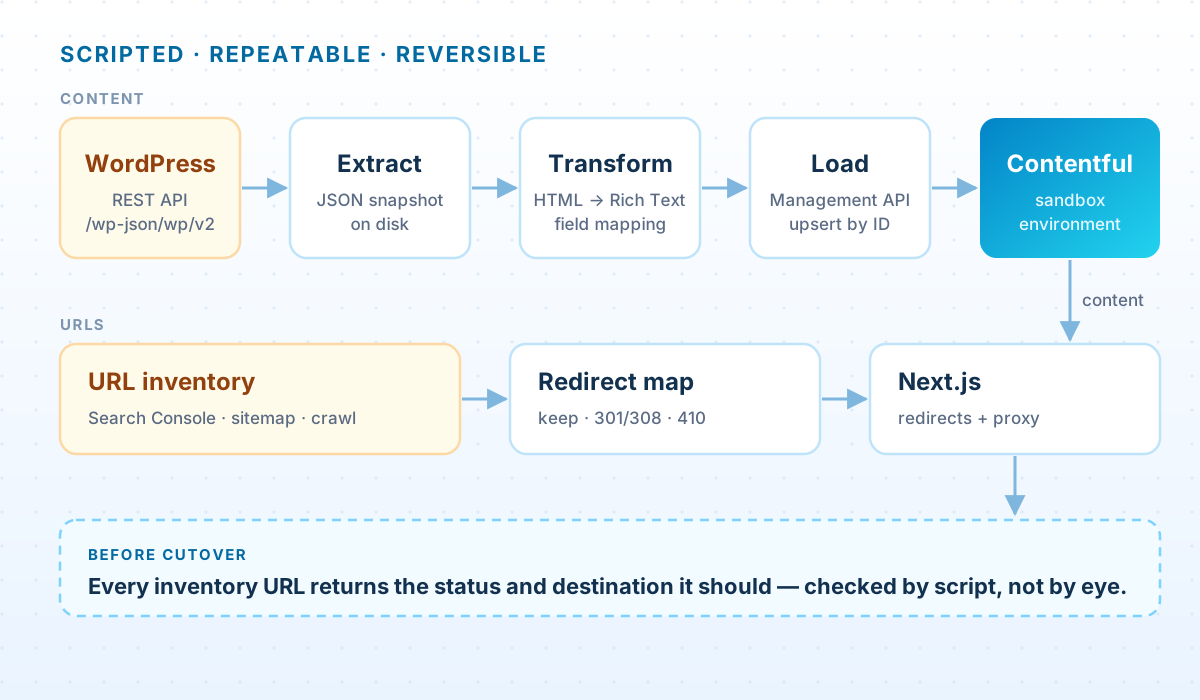
Inventory every URL before you move anything
The inventory is a spreadsheet with one row for every URL that exists today, and it's the most valuable thing the project produces. Build it from several sources, because each one misses something:
- The Search Console performance export. Every page that earned impressions or clicks, going back as far as the report allows. This is the list you can't afford to get wrong.
- The XML sitemap. WordPress serves
/wp-sitemap.xmlby default; SEO plugins such as Yoast replace it with/sitemap_index.xml. - A crawl of the live site, which finds pages that are linked internally but missing from the sitemap.
- Backlinks. The Links report in Search Console shows which pages other sites link to. Those links carry authority worth keeping, even on pages with little traffic.
- Analytics landing pages, which catch campaign URLs and pages that get their traffic from email or social rather than search.
Don't forget the URLs nobody thinks of as pages: category and tag archives, author pages, paginated archives like /page/2/, attachment pages, /feed/, short links like /?p=123, and images under /wp-content/uploads/, which can carry real image-search traffic.
Capture the SEO metadata in the same pass. Titles, meta descriptions, canonical overrides and noindex flags usually live in an SEO plugin, not in the post itself. If the site runs Yoast, every REST API response includes a yoast_head_json object with those values already resolved, which is far easier than reading the plugin's database fields.
Every row in the inventory ends with a decision: keep, redirect or retire. A URL without a decision is a URL that will 404 by accident.
Model the content; don't copy the pages
The temptation is to recreate each WordPress page as a Contentful entry with one big rich-text body. Resist it. That reproduces the structure you're leaving, and it's the one-big-rich-text-field trap. Map WordPress concepts onto a real model instead:
| WordPress | Contentful | Notes |
|---|---|---|
| Post | Article | Title, slug, excerpt as summary, body as rich text |
| Page | A specific type: Service, Landing page… | Decide page by page; avoid one generic Page type for everything |
| Category, tag | Topic entries, referenced | Becomes navigation and filtering |
| Author | Person | Bio and photo live in one place |
| Featured image | Asset, linked from the entry | Make alt text required while you're at it |
| ACF fields | Real typed fields | Only visible over REST if the field group has “Show in REST API” enabled |
| Yoast title and description | SEO fields or an SEO entry | Carried over verbatim first, improved later |
| Shortcodes, page-builder blocks | Decided case by case | See below |
Two details trip people up. First, the REST API's content.rendered is the final HTML, with shortcodes already expanded by whichever plugins are installed. If a plugin has been removed, its shortcodes come through as raw text like [gallery ids="12,14"]. Second, the block-editor markup (the <!-- wp:... --> comments) is only in content.raw, which needs an authenticated request with context=edit.
Content built in Elementor, Divi or a similar page builder is stored in the builder's own format, and its rendered HTML is layers of layout wrappers around a few sentences of copy. Converting it automatically produces something that technically imports and that nobody wants to edit. For the handful of high-value landing pages built this way, budget to rebuild them by hand in the new model. It's faster than it sounds, and it's the moment to improve them anyway.
Move the content with a script, and run it many times
A migration script that runs once is a liability. The one you want runs dozens of times: against a test environment while you tune the mapping, again after every content review, and one last time at cutover. That takes three properties:
- Snapshot first. Extract everything from WordPress into JSON files, then transform from the snapshot. You can rerun the transform a hundred times without touching the live site, and you keep a record of exactly what was migrated.
- Deterministic IDs. Derive each Contentful entry ID from the WordPress ID, such as
wp-post-123. A rerun then updates existing entries instead of creating duplicates. - A sandbox target. Load into an environment that isn't live. Nothing reaches the public site until the alias switch described in the content-modeling article.
Extract — WordPress REST API to a JSON snapshot
// extract.mjs: pull every published post and page into a local snapshot.
// It only reads, so run it as often as you like.
import { writeFile, mkdir } from 'node:fs/promises';

const WP = process.env.WP_URL;              // e.g. https://www.example.com
const TYPES = ['posts', 'pages'];

async function fetchAll(type) {
  const items = [];
  for (let page = 1, total = 1; page <= total; page++) {
    const res = await fetch(`${WP}/wp-json/wp/v2/${type}?per_page=100&page=${page}&_embed`);
    if (!res.ok) throw new Error(`${type} page ${page}: HTTP ${res.status}`);
    total = Number(res.headers.get('X-WP-TotalPages') ?? 1);
    items.push(...(await res.json()));
  }
  return items;
}

await mkdir('snapshot', { recursive: true });
for (const type of TYPES) {
  const items = await fetchAll(type);
  await writeFile(`snapshot/${type}.json`, JSON.stringify(items, null, 2));
  console.log(`${type}: ${items.length}`);
}
Requests without authentication return only published content, which is what you want: drafts stay in WordPress unless someone decides otherwise.
Transform — HTML to Contentful rich text, with a review report
The converter handles headings, lists, links, emphasis, quotes and tables. Anything it doesn't support is flattened to a paragraph and reported. Contentful validates rich-text documents when they're written, so a bad conversion fails loudly instead of quietly corrupting an entry.
// transform.mjs (excerpt): WordPress HTML -> Markdown -> Contentful Rich Text
import TurndownService from 'turndown';
import { richTextFromMarkdown } from '@contentful/rich-text-from-markdown';

const turndown = new TurndownService({ headingStyle: 'atx', codeBlockStyle: 'fenced' });
turndown.remove(['script', 'style', 'iframe', 'img']);

export async function toRichText(html, report) {
  // Inline images and leftover shortcodes are listed for a person to review,
  // not guessed at.
  for (const [, src] of html.matchAll(/<img[^>]+src="([^"]+)"/g)) report.images.push(src);
  for (const [sc] of html.matchAll(/\[\/?[a-z][\w-]*(?:\s[^\]]*)?\]/gi)) report.shortcodes.push(sc);

  const markdown = turndown.turndown(html);

  return richTextFromMarkdown(markdown, (node) => {
    // Called for anything the converter doesn't support (fenced code, for example).
    // Flatten it to a paragraph and record it.
    report.unsupported.push(node.type);
    return {
      nodeType: 'paragraph', data: {},
      content: [{ nodeType: 'text', value: node.value ?? '', marks: [], data: {} }],
    };
  });
}
Load — upsert into a sandbox environment
// load.mjs (excerpt): create or update entries whose IDs come from WordPress IDs,
// so running the load twice updates entries instead of duplicating them.
import { createClient } from 'contentful-management';

const client = createClient({ accessToken: process.env.CMA_TOKEN });
const space = await client.getSpace(process.env.SPACE_ID);
const env = await space.getEnvironment(process.env.ENVIRONMENT_ID);   // a sandbox, never master
const LOCALE = 'en-US';
const DRY_RUN = process.argv.includes('--dry-run');

const localize = (fields) =>
  Object.fromEntries(Object.entries(fields).map(([k, v]) => [k, { [LOCALE]: v }]));

export async function upsert(contentTypeId, id, fields) {
  if (DRY_RUN) return console.log('would write', contentTypeId, id);
  let entry;
  try {
    entry = await env.getEntry(id);
    entry.fields = localize(fields);
    entry = await entry.update();
  } catch (err) {
    if (err.name !== 'NotFound') throw err;
    entry = await env.createEntryWithId(contentTypeId, id, { fields: localize(fields) });
  }
  return entry.publish();
}

// usage: await upsert('article', `wp-post-${post.id}`, { title, slug, summary, body });
The Management API is rate limited per space (seven requests a second on free plans, ten on paid ones), and the official client retries rate-limited requests on its own. Run the load one entry at a time or with low concurrency; even a few thousand entries finishes in minutes.
The most useful output isn't the entries, it's the report: inline images to re-place, leftover shortcodes, unsupported blocks. That list becomes the editorial team's to-do list before cutover.
URL decisions: keep, redirect or retire
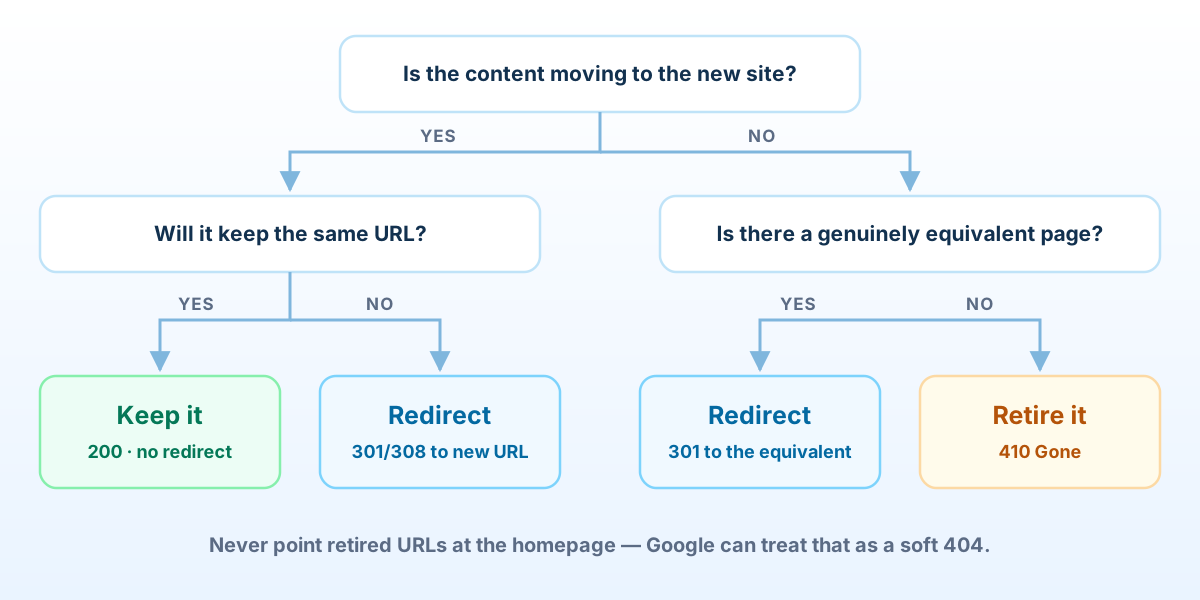
The best redirect is no redirect. Wherever you can, keep the exact URL. If WordPress served a post at /insights/data-strategy/, the new site can too. Changing a URL for tidiness alone means maintaining a redirect forever.
When a URL must change, redirect it permanently to the closest equivalent. Next.js's redirects setting sends a 308 for permanent redirects rather than a 301, because a 308 also preserves the request method. Google's documentation treats 308 the same as 301, so either is fine for search.
next.config.mjs — redirects generated from the inventory
// next.config.mjs: permanent redirects generated from the URL inventory
import { readFileSync } from 'node:fs';

// [{ "from": "/2021/04/data-strategy/", "action": "redirect", "to": "/insights/data-strategy" }, ...]
const inventory = JSON.parse(readFileSync(new URL('./redirects.json', import.meta.url), 'utf8'));

export default {
  async redirects() {
    return inventory
      .filter((r) => r.action === 'redirect')
      .map((r) => ({ source: r.from, destination: r.to, permanent: true }));   // sends 308
  },
};

// WordPress URLs usually end in "/". Check how your trailingSlash setting treats
// them, and confirm every old URL resolves in a single hop (see the check below).
Three rules keep redirects healthy:
- One hop. Redirect straight to the final URL. Google will follow up to ten hops, but chains slow crawling down and break when someone edits a link in the middle.
- Relevant destinations only. Pointing hundreds of retired URLs at the homepage looks tidy and doesn't work. Google can treat an irrelevant redirect as a soft 404, so you get the downside of a 404 with extra steps.
- Images too. Images under
/wp-content/uploads/that earn traffic or are embedded on other sites can redirect to their new Contentful asset URLs.
Content you're deliberately removing (an old shop, expired events, thin tag archives) should return 410 Gone. To be clear about what that buys you: Google says it treats 404 and 410 the same way. Use 410 because it's accurate (it tells people and tools that the removal was deliberate), not because it's faster. In Next.js 16 that logic lives in proxy.ts, which earlier versions called middleware.ts:
proxy.ts — 410 Gone for retired content
// proxy.ts: answer 410 Gone for content that was deliberately retired.
import { NextResponse, type NextRequest } from 'next/server';
import retired from './retired-paths.json';   // ["/shop", "/2016/03/old-news", ...]

const norm = (p: string) => p.replace(/\/+$/, '') || '/';
const RETIRED_PATHS = new Set<string>(retired.map(norm));
const RETIRED_SECTIONS = ['/product', '/product-category', '/cart', '/checkout', '/my-account'];

export function proxy(request: NextRequest) {
  const path = norm(request.nextUrl.pathname);
  const retiredSection = RETIRED_SECTIONS.some((s) => path === s || path.startsWith(`${s}/`));
  if (retiredSection || RETIRED_PATHS.has(path)) {
    return new NextResponse('This page has been permanently removed.', {
      status: 410,
      headers: { 'Content-Type': 'text/plain; charset=utf-8' },
    });
  }
  return NextResponse.next();
}

export const config = {
  matcher: ['/((?!_next/static|_next/image|favicon.ico).*)'],
};Both redirects and proxy need a running Next.js server. If the site is a static export, the same redirect map has to be applied by the host or CDN instead, through an .htaccess file, your host's redirect rules or edge configuration.
What Search Console will say afterwards, and which warnings to ignore
A few weeks after cutover, Search Console will email you that some pages aren't being indexed, with a list of new reasons. It reads like an alarm. Most of it is your migration working as designed:
| Reason | What it usually means after a migration | Action |
|---|---|---|
| Page with redirect | Old URLs you redirected on purpose | None, if each is in your redirect map |
| Alternate page with proper canonical tag | URL variants such as tracking parameters or index.html pointing at the canonical page | None: Google is confirming your canonical tags work |
| Not found (404) | URLs without a decision in the inventory, or a typo in the redirect map | Check each one; redirect anything with traffic or links |
| Blocked due to other 4xx issue | Usually where retired URLs returning 410 are reported | None, if they're on your retire list |
| Soft 404 | Redirects to irrelevant pages, or near-empty pages | Redirect to a real equivalent, or retire with 410 |
| Duplicate without user-selected canonical | New pages missing a canonical tag | Add self-referencing canonicals |
The first two reasons confirm things are working; the rest need reading row by row. Export the URLs behind each reason and compare them with the inventory. Anything you made a decision about is fine. Anything you didn't is a gap.
Cutover-day checklist
- Freeze publishing in WordPress, run the final extract and load, and get editorial sign-off on the migration report.
- Switch the Contentful alias to the migrated environment and deploy the production build.
- Run the inventory check below against production. Every row must return the status and destination you decided on, in one hop.
- Remove any staging
noindexand checkrobots.txt. A leftover staging rule that blocks search engines is the most expensive one-line mistake in this whole process. - Submit the new sitemap in Search Console and request indexing for your most important pages.
- Check analytics, tag manager and every form on the new site before announcing anything.
- Keep WordPress private but available, as a read-only copy plus a database backup, for at least three months in case something needs recovering.
verify-urls.sh — check every inventory URL in one pass
Run it before cutover against staging, on cutover day against production, a week later, and after every change to the redirect map.
#!/usr/bin/env bash
# verify-urls.sh: check every inventory URL against the decision made for it.
# inventory.csv columns: url,expected_status,expected_location
set -uo pipefail
fail=0
while IFS=, read -r url want_status want_location || [ -n "$url" ]; do
  url=${url%$'\r'}; want_status=${want_status%$'\r'}; want_location=${want_location%$'\r'}
  [ "$url" = "url" ] && continue                                   # header row
  out=$(curl -s -o /dev/null -w '%{http_code} %{redirect_url}' "$url")
  status=${out%% *}; location=${out#* }
  ok=1
  [ "$status" = "$want_status" ] || ok=0
  if [ -n "$want_location" ]; then
    if [ "$location" = "$want_location" ]; then
      # The destination must answer 200 itself: one hop, no chains.
      final=$(curl -s -o /dev/null -w '%{http_code}' "$location")
      [ "$final" = "200" ] || ok=0
    else
      ok=0
    fi
  fi
  if [ "$ok" = 1 ]; then
    echo "ok    $status  $url"
  else
    echo "FAIL  $status  $url -> ${location:-none}   (wanted $want_status ${want_location})"
    fail=$((fail + 1))
  fi
done < "${1:-inventory.csv}"
echo "$fail failure(s)"
[ "$fail" -eq 0 ]
When not to migrate
Every reason to move comes with a cost, and sometimes the cost wins:
- The WordPress site works and the team likes it. If nobody waits on developers to publish, the migration mostly buys performance, and there may be cheaper ways to get that.
- It's really a store. Contentful isn't a commerce platform. A WooCommerce shop needs a commerce engine, with Contentful optionally handling the marketing content around it.
- Nobody will own the content model. Without an owner, a headless CMS slowly becomes an expensive way to store unstructured text.
- There's no time for the inventory. If the launch date is fixed and the URL work won't fit, move the date. The traffic you lose later costs more than the delay.
Questions we get asked
Will we lose rankings?
Some movement in the first few weeks is normal while Google recrawls. Pages whose URLs are kept, or redirected one-to-one with their metadata carried over, usually recover. The large, lasting drops come from missing redirects and lost metadata, which is what this process is designed to prevent.
How long does a migration take?
The scripting is rarely the long part. Content decisions are: which pages to keep, what to retire, how to rebuild page-builder layouts. Those depend on the size of the site and how quickly the team can decide, which is why the inventory comes first.
What happens to blog comments?
Contentful isn't a comments system. Export them for the record, and if comments matter to you, use a dedicated comments service on the new site.
Can we migrate in stages?
Yes. Routing rules at the host or a reverse proxy can serve some paths from the new site and the rest from WordPress, so you can move section by section. It adds routing complexity, so it mostly pays off for large sites.
Do we need to keep WordPress running?
Not publicly. Keep a private read-only copy and a database backup for a few months so anything missed can be recovered, then retire it.
Planning a move off WordPress?
We'll inventory your URLs, work out what's worth migrating and what's worth retiring, and give you a cutover plan that protects the search traffic you've already earned.
Book a migration assessment