
Somewhere on your network there's a folder called something like \\fs01\Finance\Imports\DROP. Every night a vendor's FTP job puts a file there. At 2am a scheduled task on a server nobody has logged into for a year picks it up, sometimes before the vendor has finished writing it. Nobody owns the folder, everyone depends on it, and the file server it lives on is due for replacement.
Moving that to the cloud sounds like a storage project: copy the files to S3 and point everyone at the new location. It isn't, because a file share does several different jobs at once, and S3 suits some of them far better than others. This is how we decide what goes where, and how to move it without breaking the processes that depend on a folder nobody remembers creating.
One server, several jobs
Look at what a typical file server actually does and you'll find several unrelated jobs sharing one machine:
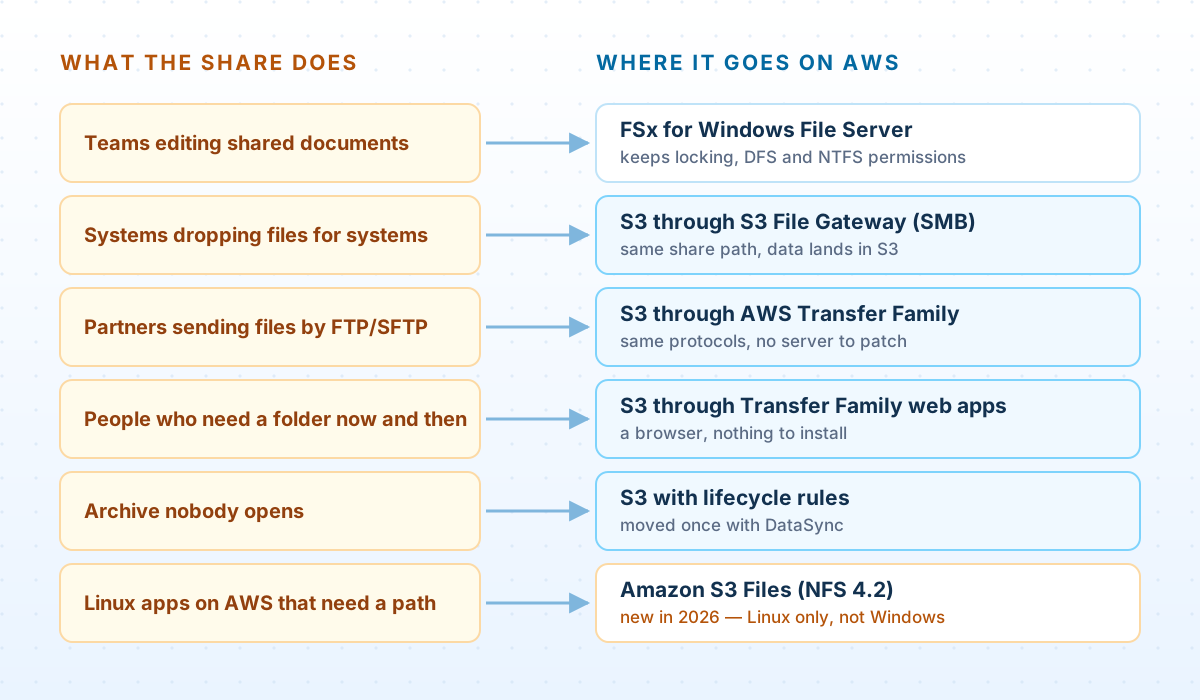
Most of the cost and risk sits in the middle rows: folders used as integration points between systems and partners. Those are also where S3 does best, because what those processes really want is a durable place to put a file and a reliable signal that it has arrived, and a share provides only the first.
Inventory the shares
As with any migration, start by finding out what you have. For every share: how big it is, when it was last written to, how much of it is stale, and who can reach it:
PowerShell — share inventory: size, staleness and access
# Inventory every share on a file server: size, file count, last write, staleness, access.
# Run it off-hours: it reads every file's metadata.
$server = "fs01"
Get-SmbShare -CimSession $server | Where-Object { $_.Name -notlike '*$' } | ForEach-Object {
    $path  = "\\$server\$($_.Name)"
    $files = Get-ChildItem -LiteralPath $path -Recurse -File -ErrorAction SilentlyContinue
    [pscustomobject]@{
        Share      = $_.Name
        Files      = $files.Count
        SizeGB     = [math]::Round(($files | Measure-Object Length -Sum).Sum / 1GB, 1)
        LastWrite  = ($files | Sort-Object LastWriteTime -Descending | Select-Object -First 1).LastWriteTime
        StaleFiles = ($files | Where-Object LastWriteTime -lt (Get-Date).AddYears(-2)).Count
        Access     = (Get-SmbShareAccess -CimSession $server -Name $_.Name |
                      ForEach-Object { "$($_.AccountName):$($_.AccessRight)" }) -join "; "
    }
} | Export-Csv -NoTypeInformation share-inventory.csv
The numbers sort the shares quickly. A share nobody has written to in two years is an archive, whatever it's called. Then comes the slower part: finding who uses each share. Search scripts, scheduled tasks, SSIS packages and application configuration for the server's name and its UNC paths. Hard-coded \\fs01\... paths are the dependencies that break on cutover day, and if SSIS is involved, our SSIS article covers that side.
Can we just map S3 as a drive?
It's the first question every team asks, and in 2026 it has a more interesting answer than it used to.
Amazon S3 Files, generally available since April 2026, lets you mount an S3 bucket as a shared file system. It's a significant launch, with one limit that matters here: it supports a list of Linux distributions on AWS compute, and AWS's documentation states plainly that Windows and macOS are not supported. It mounts over NFS 4.2, always with TLS and IAM authentication:
# Amazon S3 Files: Linux on AWS compute only. Mounts over NFS 4.2, always with TLS and IAM.
sudo mount -t s3files fs-0123456789abcdef0:/ /mnt/s3files
That makes S3 Files a good fit for Linux applications and containers on AWS that expect a file path, and no help at all for mapping a drive letter on a Windows desktop. The same is true of Mountpoint for Amazon S3, AWS's open-source file client, which is also Linux-only.
For Windows clients, AWS's answer remains S3 File Gateway: a gateway that presents an SMB share and stores what's written to it as objects in S3. There are also third-party tools that map a bucket to a drive letter directly. They work for browsing and occasional use, but they can't change what S3 is. S3 stores whole objects. It has no rename, no partial update and no file locking, so a rename becomes a copy and a delete, and an edit becomes a rewrite of the whole object. Desktop applications that expect those file-system behaviors, Office in particular, can behave unpredictably.
Map S3 as a drive for systems that write whole files and leave them alone. Don't use it for people editing documents together; that job belongs on a real file server (see below).
System drop zones: S3 File Gateway
S3 File Gateway runs as a virtual machine on your own network (VMware, Hyper-V or KVM) or as an EC2 instance. It presents an SMB share backed by an S3 bucket, with a local cache in front. To the system writing files, nothing changes except the path:
New-SmbMapping -LocalPath "S:" -RemotePath "\\sgw-finance.corp.example.com\finance-imports" -Persistent $trueBehind the share, each file becomes an object whose key is the file's path, and the gateway uploads changes to S3 in the background. A few behaviors catch teams out:
- Renames, permission changes and appends replace the object. Each creates a new S3 object, and in infrequent-access or archive storage classes that can trigger early-deletion and retrieval charges.
- Every file becomes at least two object versions, because the gateway uploads the data and then the metadata. If versioning is on, add a lifecycle rule that expires old versions.
- Large files can arrive in pieces. To free cache space, the gateway may upload part of a file before the writer has finished, so a pipeline triggered by ordinary S3 “object created” events can pick up a half-written file.
- Files written straight to S3 don't appear on the share until the gateway refreshes its cache. If other systems write to the same bucket, schedule a cache refresh or trigger one on new objects.
The third point is the important one, and the gateway has a built-in answer: a file upload notification, sent once a file is completely in S3 and no new writes have arrived for a settling period.
Enable per-file upload notifications on the share
# Ask the gateway to announce each file once it is fully in S3, after 60 quiet seconds.
aws storagegateway update-smb-file-share \
  --file-share-arn "$FILE_SHARE_ARN" \
  --notification-policy '{"Upload": {"SettlingTimeInSeconds": 60}}'
FTP drops: AWS Transfer Family
Partners who send files by FTP or SFTP keep their clients and their habits. Only the hostname and credentials change. AWS Transfer Family runs a managed SFTP, FTPS or FTP endpoint that writes straight into S3, with no server to patch.
Plain FTP gets special treatment, and rightly so: it's only available on a VPC endpoint reachable from your own network (over Direct Connect or VPN), never from the internet. Internet-facing endpoints offer SFTP, FTPS and AS2. If a partner still sends plain FTP over the internet today, the migration is a good moment to move them to SFTP.
Give each partner its own user, confined to its own prefix with a logical directory, so a partner sees one folder and can't browse anyone else's:
Transfer Family — a partner user confined to its own prefix
# One user per partner, confined to their own prefix: they see "/" and nothing else.
aws transfer create-user \
  --server-id "$SERVER_ID" \
  --user-name partner-acme \
  --role arn:aws:iam::123456789012:role/transfer-partner-acme \
  --home-directory-type LOGICAL \
  --home-directory-mappings '[{"Entry": "/", "Target": "/example-file-drops/incoming/acme"}]' \
  --ssh-public-key-body "$(cat acme_ed25519.pub)"
Pair it with an IAM role that only allows that prefix, so the confinement doesn't rely on the directory mapping alone. For the opposite direction, pulling files from a partner's server on a schedule, see our SFTP ingestion article.
Trigger on completion, not on arrival
The scheduled task that polls a folder at 2am is the most fragile part of the old setup. It picks up files that aren't finished, misses files that arrive late, and fails silently when a vendor changes a file name. Moving to S3 is the chance to replace polling with events:
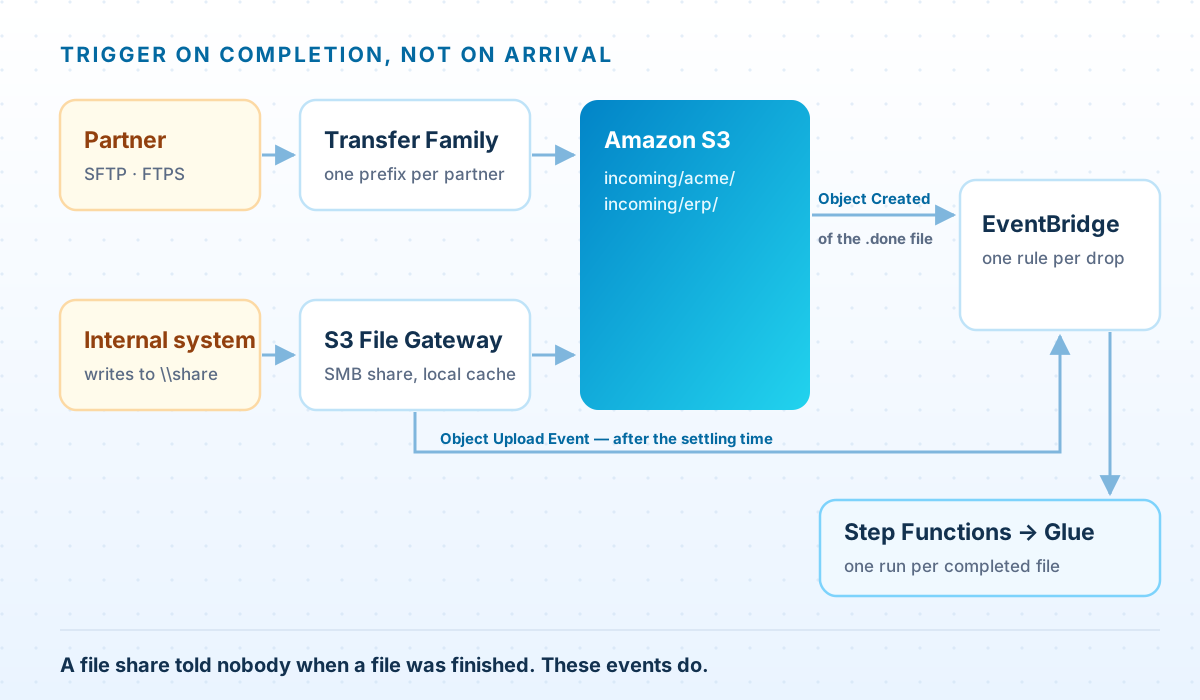
For files that come through the gateway, an EventBridge rule matches the upload-complete event:
EventBridge rule — files completed through S3 File Gateway
{
  "source": ["aws.storagegateway"],
  "detail-type": ["Storage Gateway Object Upload Event"],
  "detail": {
    "event-type": ["object-upload-complete"],
    "bucket-name": ["example-file-drops"],
    "object-key": [{ "suffix": ".csv" }]
  }
}
For partner uploads, an S3 object only appears once its upload has completed, but “this upload completed” isn't the same as “the partner has sent everything”. Agree a completion signal (a manifest, or an empty .done file written last) and trigger on that. Turn on EventBridge delivery for the bucket, then match the signal:
aws s3api put-bucket-notification-configuration --bucket example-file-drops \
  --notification-configuration '{"EventBridgeConfiguration": {}}'
EventBridge rule — a partner's completion file
{
  "source": ["aws.s3"],
  "detail-type": ["Object Created"],
  "detail": {
    "bucket": { "name": ["example-file-drops"] },
    "object": { "key": [{ "wildcard": "incoming/acme/*.done" }] }
  }
}
Whatever the rule starts, make the processing idempotent: processing the same file twice must leave the same result. Events can be delivered more than once, and a rerun after a failure should never double-count.
People who just need a folder
Some users don't need a drive letter at all. They need to download a monthly report or upload a signed form now and then. For them, Transfer Family web apps provide a browser-based portal over S3, with nothing to install. Users sign in through IAM Identity Center, and S3 Access Grants decide which folders each person sees. Worth knowing before you promise it: uploads are limited to 160 GB per file, the buckets must be in the same account as the web app, and the bucket needs a CORS configuration.
Moving the data
For the bulk move, AWS DataSync copies from an SMB share to S3 through an agent that can reach the file server. It copies incrementally and verifies what it copied, so you can run it repeatedly while the old share is still in use and do one short final sync at cutover:
DataSync — SMB share to S3, incremental and verified
# 1. Where the files are now (through a DataSync agent that can reach the server)
aws datasync create-location-smb \
  --server-hostname fs01.corp.example.com \
  --subdirectory /Finance/Archive \
  --user svc-datasync --domain CORP --password "$SMB_PASSWORD" \
  --agent-arns "$AGENT_ARN"

# 2. Where they're going
aws datasync create-location-s3 \
  --s3-bucket-arn arn:aws:s3:::example-file-archive \
  --subdirectory /finance \
  --s3-config BucketAccessRoleArn=arn:aws:iam::123456789012:role/datasync-archive

# 3. Copy only what changed since the last run, and verify what was copied
aws datasync create-task \
  --name finance-archive-to-s3 \
  --source-location-arn "$SMB_LOCATION_ARN" \
  --destination-location-arn "$S3_LOCATION_ARN" \
--options VerifyMode=ONLY_FILES_TRANSFERRED,TransferMode=CHANGED,PreserveDeletedFiles=PRESERVEDataSync does not carry Windows ACLs into S3. Objects arrive with default permission metadata, and the NTFS permissions are simply not there. That's not a bug to work around; it's the point where access has to be redesigned, which is the next section.
At cutover, stop writes to the old share, run the final sync, and switch everything that pointed at the old path: drive mappings pushed by Group Policy, DFS namespace targets, scripts and application settings. Keep the old share read-only for a while before removing it.
Permissions: from NTFS to prefixes
Ten years of NTFS permissions are usually a mix of groups, individuals who left long ago, and “Everyone: Full Control” on the folder that mattered most. Don't try to reproduce them. Design the bucket layout around who needs what:
- One prefix per access boundary: per partner, per system, per team. Permissions are then granted by prefix, through IAM roles for systems and S3 Access Grants for people.
- Block Public Access on for every bucket, with encryption on by default.
- Gateway shares can still enforce Windows ACLs for SMB clients when the gateway is joined to Active Directory. Use that for continuity during the move, not as the long-term model.
When to keep a Windows file server
Not every share should become a bucket. Teams editing documents together depend on file locking, opportunistic locks, shadow copies and DFS. If that's the job, the cloud destination is Amazon FSx for Windows File Server: a managed Windows file server with real SMB semantics and Active Directory integration. It isn't S3, and that's the point. If analytics later needs that data, copy it to S3 on a schedule with DataSync rather than making people work against object storage.
Questions we get asked
Can we map an S3 bucket as a drive letter in Windows?
Not with Amazon S3 Files or Mountpoint for Amazon S3: both are Linux-only. AWS's option for Windows clients is S3 File Gateway, which presents an SMB share backed by S3. Third-party tools can map a bucket to a drive letter directly; they're fine for browsing, but S3 still has no renames, partial updates or locking underneath.
Is Amazon S3 Files a replacement for S3 File Gateway?
No, they serve different clients. S3 Files mounts a bucket over NFS 4.2 for Linux compute on AWS. S3 File Gateway serves SMB and NFS clients, including Windows machines on your own network, with a local cache in front of S3.
Will our partners have to change anything?
Usually only the hostname and their credentials. Transfer Family supports SFTP, FTPS and FTP, though plain FTP is only available to clients on your own network, never over the internet. Partners using plain FTP over the internet should move to SFTP.
What happens to our NTFS permissions?
DataSync doesn't carry Windows ACLs into S3, so permissions are redesigned around prefixes, with IAM roles for systems and S3 Access Grants for people. Gateway shares can enforce Windows ACLs for SMB clients during the transition if the gateway is joined to Active Directory.
Do we need the gateway forever?
Only while systems still need an SMB path. Once those systems write to S3 directly, or through Transfer Family, the gateway can be retired and the bucket stays exactly where it is.
Still running a file server that everything depends on?
We'll inventory your shares and FTP drops, sort them by the job each one actually does, and plan the move — including the processes that pick the files up.
Book a file estate assessment