
Every SSIS estate has one package nobody will touch. It was written by someone who left years ago, it runs in the middle of the night, and the month-end finance close depends on it. That package, not the migration plan's timeline, decides when you're actually done.
SSIS has run a great deal of the world's reporting reliably for a long time. The reasons to leave it are usually about everything around it: SQL Server licensing, Windows servers to patch, a shrinking pool of people who want to maintain packages, and data that increasingly lives in the cloud anyway. The way out that works is rarely a rewrite of everything at once. It's a sequence of small, provable moves.
This is how we approach it: inventory first, map patterns rather than packages, move one subject area at a time, and prove every move with automated reconciliation before anyone switches over.
Why SSIS migrations stall
The packages are rarely the hard part. The hard part is that the logic is spread across three places, and the packages are only one of them:
- The packages themselves: data flows, lookups, conditional splits, and the occasional Script Task holding a few hundred lines of C# that nobody has opened since it was written.
- Stored procedures called from Execute SQL Tasks, where much of the real business logic tends to live.
- SQL Agent: schedules, job chains, retry settings and “on failure, go to step 4” logic that exists nowhere else.
A big-bang rewrite has to get all three exactly right on the same day, for every report at once. That's why so many of them slip, and why the ones that “finish” often end in a month-end close where the numbers don't match and nobody can say which system is right.
Inventory first
Before deciding anything, find out what you have. As with any migration, the inventory is the most valuable thing the project produces, and SQL Server keeps most of what you need in two places. SQL Agent knows what runs and when:
T-SQL — SQL Agent jobs that run SSIS packages
-- 1. Every SQL Agent job step that runs an SSIS package, with its schedule.
SELECT  j.name          AS job_name,
        j.enabled       AS job_enabled,
        s.step_id,
        s.step_name,
        s.command       AS package_command,
        sch.name        AS schedule_name,
        sch.freq_type,
        sch.freq_interval,
        sch.active_start_time
FROM        msdb.dbo.sysjobs         AS j
JOIN        msdb.dbo.sysjobsteps     AS s   ON s.job_id = j.job_id
LEFT JOIN   msdb.dbo.sysjobschedules AS js  ON js.job_id = j.job_id
LEFT JOIN   msdb.dbo.sysschedules    AS sch ON sch.schedule_id = js.schedule_id
WHERE   s.subsystem = 'SSIS'
ORDER BY j.name, s.step_id;
The SSIS catalog knows how each package actually behaves:
T-SQL — run history from the SSIS catalog
-- 2. How often each deployed package really runs, how long it takes, how often it fails.
SELECT  e.folder_name,
        e.project_name,
        e.package_name,
        COUNT(*)                                             AS runs,
        SUM(CASE WHEN e.status IN (4, 6) THEN 1 ELSE 0 END)  AS failures,  -- failed, ended unexpectedly
        AVG(DATEDIFF(SECOND, e.start_time, e.end_time))      AS avg_seconds,
        MAX(e.start_time)                                    AS last_run
FROM    SSISDB.catalog.executions AS e
WHERE   e.start_time >= DATEADD(DAY, -90, SYSDATETIMEOFFSET())
GROUP BY e.folder_name, e.project_name, e.package_name
ORDER BY runs DESC;
Two gaps to close by hand. Packages deployed with the older package deployment model live in msdb or the file system rather than the SSIS catalog, so they need a separate sweep. And neither query tells you who reads the output, so list the reports, extracts and downstream jobs that depend on each target table. Those are the people whose numbers have to keep matching.
The result is one row per package: owner, schedule, typical runtime, failure rate, sources, targets, consumers, complexity, and a decision. Packages that haven't run in a year are usually the easiest win of the whole project: retire them.
Map patterns, not packages
Converting packages one by one reproduces their structure, including the workarounds. Map the patterns instead. A hundred packages are usually built from a dozen recurring shapes, and each shape needs one well-tested equivalent:
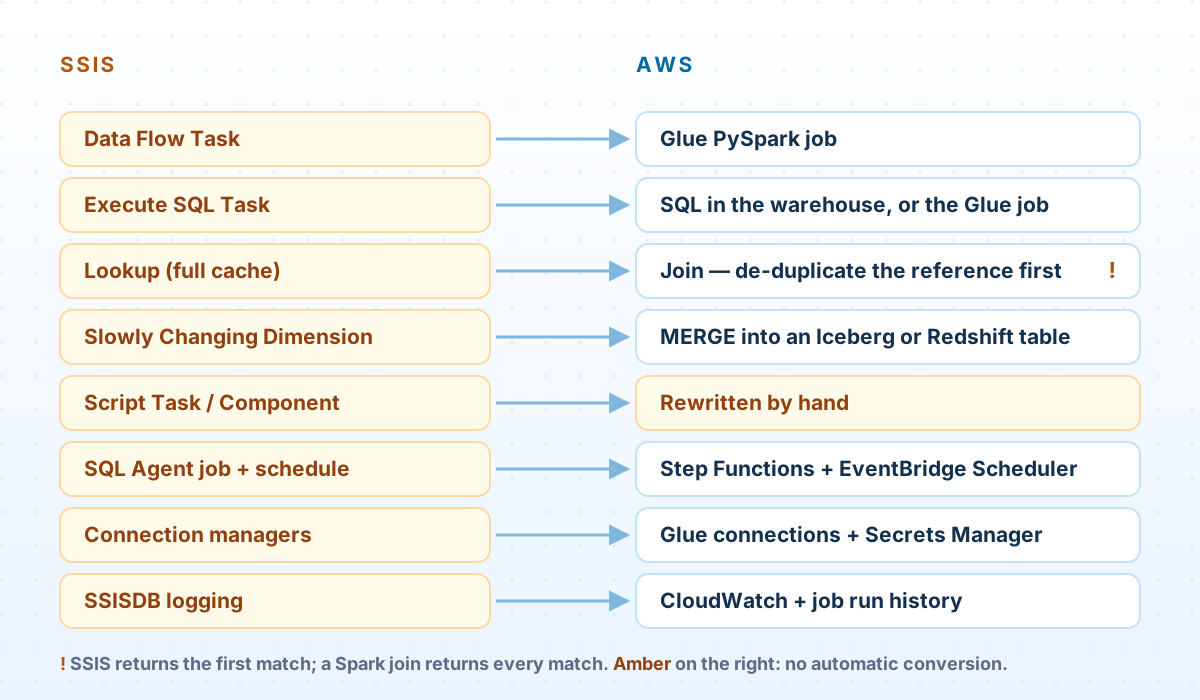
- Data flows become Glue PySpark jobs. Sources, conditional splits, derived columns and aggregates translate directly; the pipeline guide covers the job design.
- Execute SQL Tasks stay SQL where they can. Logic that runs inside the warehouse should keep running inside the warehouse, just a new one.
- Slowly Changing Dimension transformations become a
MERGE, the same pattern as in our change data capture article. - SQL Agent becomes Step Functions for the job chain and EventBridge Scheduler for the timing. If your jobs depend on many systems beyond AWS, managed Airflow may fit better; our comparison covers that choice.
- Connection managers become Glue connections, with credentials in Secrets Manager instead of package configurations.
The behavior you have to keep
A translation that's logically correct can still produce different numbers, because SQL Server, SSIS and Spark don't agree on what “equal” means. These are the differences behind most “the numbers don't match” meetings:
- Case. SQL Server's common default collations are case-insensitive, so
'ACME'and'Acme'group and join as one value. Spark compares exactly, and the sameGROUP BYreturns two rows. - Trailing spaces. SQL Server ignores them when comparing strings, which matters wherever
CHARcolumns pad values. Spark doesn't. - The Lookup's cache mode. In full cache mode, an SSIS Lookup compares inside SSIS, which is case-sensitive and sensitive to trailing spaces. In partial or no-cache mode, SQL Server does the comparison using the column's collation. The same package can return different matches depending on a setting that was probably chosen for performance years ago.
- Multiple matches. When the reference data has duplicate keys, an SSIS Lookup returns only the first match. A Spark join returns every match, and your fact table quietly grows. De-duplicate reference data deliberately before the join, and decide which duplicate wins.
- No match. By default an SSIS Lookup treats a missing match as an error; many packages redirect those rows instead. The replacement has to make the same choice explicitly: fail, drop, or keep with nulls.
- Time precision. SQL Server's
datetimetype is accurate to about a three-hundredth of a second, so values copied between systems can differ by a few milliseconds without anything being wrong.
Sometimes reconciliation shows the new pipeline is right and SSIS has been wrong for years: a lookup silently dropping rows, a rounding bug in a Script Task. Don't quietly fix it. Write it down, show the business owner, and agree which behavior to keep before the numbers change in a board report.
Move one subject area at a time
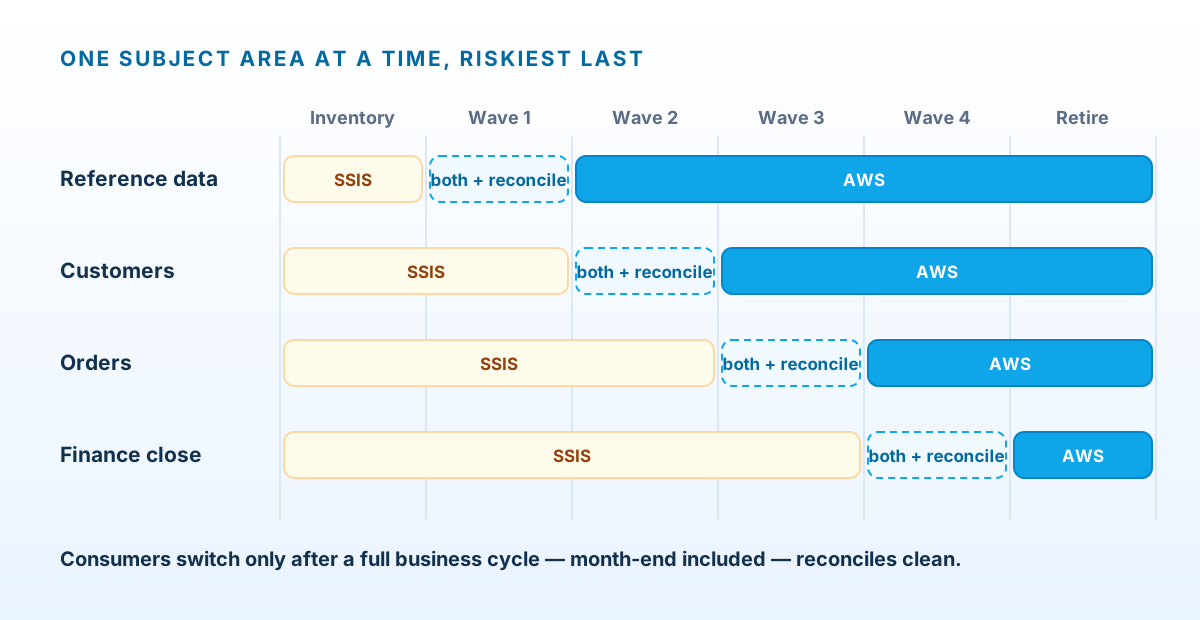
Group packages by the business data they produce (reference data, customers, orders, finance) rather than by server or by folder. Then move one group at a time, in this order:
- Rebuild the group's pipelines on AWS, reading from the same sources.
- Run both side by side, each writing to its own target.
- Reconcile the outputs automatically, every run, until they agree.
- Switch consumers to the new target: re-point the reports, or swap a view underneath them.
- Disable the old packages, without deleting them yet.
Start with something that matters but won't stop the business, such as reference data, because the first wave is where you build and test the patterns. Leave the package nobody will touch for last. By then the patterns are proven, the reconciliation is automatic, and the team has done this several times.
Prove it before cutover
Parallel runs are only useful if someone compares the outputs, and comparing by eye doesn't survive the second week. This Glue job compares the legacy table with the new one key by key, applying the equality rules above, and fails if anything doesn't match:
Reconciliation job — legacy output vs new output
# reconcile.py: compare the legacy SSIS output with the new pipeline's output, row by row.
import json
import sys
from awsglue.context import GlueContext
from awsglue.utils import getResolvedOptions
from pyspark.context import SparkContext
from pyspark.sql import functions as F

args = getResolvedOptions(sys.argv, ["LEGACY_CONNECTION", "LEGACY_TABLE", "NEW_TABLE", "KEYS"])
glue = GlueContext(SparkContext.getOrCreate())
spark = glue.spark_session
KEYS = args["KEYS"].split(",")                         # e.g. "order_id,line_no"

legacy = glue.create_dynamic_frame.from_options(
    connection_type="sqlserver",
    connection_options={"useConnectionProperties": "true",
                        "connectionName": args["LEGACY_CONNECTION"],
                        "dbtable": args["LEGACY_TABLE"]},
).toDF()
new = spark.table(args["NEW_TABLE"])


def same(dtype, a, b):
    """Null-safe equality that matches what SQL Server meant by 'equal'."""
    if dtype == "string":
        eq = F.rtrim(a) == F.rtrim(b)                  # SQL Server ignores trailing spaces
    elif dtype in ("float", "double"):
        eq = F.abs(a - b) <= 1e-9 * F.greatest(F.abs(a), F.abs(b), F.lit(1.0))
    elif dtype.startswith("timestamp"):
        eq = F.abs(a.cast("double") - b.cast("double")) <= 0.004   # datetime: ~1/300 s
    else:
        eq = a == b
    return (a.isNull() & b.isNull()) | F.coalesce(eq, F.lit(False))


def keyed(df, side):
    """Prefix columns with the side, and build join keys the way the legacy collation compares."""
    types = dict(df.dtypes)
    keys = [(F.upper(F.rtrim(F.col(k))) if types[k] == "string" else F.col(k)).alias(f"_k_{k}")
            for k in KEYS]
    return df.select(*keys, F.lit(True).alias(f"_in_{side}"),
                     *[F.col(c).alias(f"{side}_{c}") for c in df.columns])


types = dict(new.dtypes)
compare = [c for c in new.columns if c in legacy.columns and c not in KEYS]
joined = keyed(legacy, "l").join(keyed(new, "n"), on=[f"_k_{k}" for k in KEYS], how="full_outer").cache()
both = joined.filter(F.col("_in_l") & F.col("_in_n"))

per_column = both.agg(*[
    F.sum(F.when(~same(types[c], F.col(f"l_{c}"), F.col(f"n_{c}")), 1).otherwise(0)).alias(c)
    for c in compare
]).first().asDict()

summary = {
    "legacy_rows": legacy.count(),
    "new_rows": new.count(),
    "duplicate_keys_new": new.groupBy(*KEYS).count().filter("count > 1").count(),
    "only_in_legacy": joined.filter(F.col("_in_n").isNull()).count(),
    "only_in_new": joined.filter(F.col("_in_l").isNull()).count(),
    "mismatched_by_column": {c: n for c, n in per_column.items() if n},
}
print(json.dumps(summary, indent=2))

if any(summary[k] for k in ("duplicate_keys_new", "only_in_legacy", "only_in_new", "mismatched_by_column")):
    raise RuntimeError("Reconciliation failed: " + json.dumps(summary))
A few details that matter:
- It reports by column. “
discount_amount: 412 rows” points straight at a rounding rule. “Totals don't match” points at nothing. - It checks for duplicate keys. That's the Lookup multiple-match problem showing up before anyone sees an inflated revenue figure.
- Keys are compared the way the legacy collation compares them, case-insensitively and ignoring trailing spaces, while values are compared exactly. A difference in case in a value is a real difference in the output and is reported as one.
Run it for at least one full business cycle that includes a month-end. Month-end is when the unusual code paths run: accruals, reversals, late adjustments. A clean Tuesday proves much less than a clean close.
Replacing SQL Agent
A SQL Agent job is a list of steps with “on success” and “on failure” actions. A Step Functions state machine says the same thing explicitly, and adds retries with backoff, failure alerts and a visual history of every run:
Step Functions — the nightly finance load as a state machine
{
  "Comment": "Nightly finance load. Replaces SQL Agent job 'FIN - Nightly Load'.",
  "StartAt": "LoadStaging",
  "States": {
    "LoadStaging": {
      "Type": "Task",
      "Resource": "arn:aws:states:::glue:startJobRun.sync",
      "Parameters": { "JobName": "fin-load-staging",
                      "Arguments": { "--run_ts.$": "$$.Execution.StartTime" } },
      "Retry": [{ "ErrorEquals": ["States.TaskFailed"], "IntervalSeconds": 300,
                  "MaxAttempts": 2, "BackoffRate": 2 }],
      "Catch": [{ "ErrorEquals": ["States.ALL"], "ResultPath": "$.error", "Next": "NotifyFailure" }],
      "ResultPath": null,
      "Next": "BuildFacts"
    },
    "BuildFacts": {
      "Type": "Task",
      "Resource": "arn:aws:states:::glue:startJobRun.sync",
      "Parameters": { "JobName": "fin-build-facts",
                      "Arguments": { "--run_ts.$": "$$.Execution.StartTime" } },
      "Retry": [{ "ErrorEquals": ["States.TaskFailed"], "IntervalSeconds": 300,
                  "MaxAttempts": 2, "BackoffRate": 2 }],
      "Catch": [{ "ErrorEquals": ["States.ALL"], "ResultPath": "$.error", "Next": "NotifyFailure" }],
      "ResultPath": null,
      "Next": "Reconcile"
    },
    "Reconcile": {
      "Type": "Task",
      "Resource": "arn:aws:states:::glue:startJobRun.sync",
      "Parameters": { "JobName": "fin-reconcile" },
      "Catch": [{ "ErrorEquals": ["States.ALL"], "ResultPath": "$.error", "Next": "NotifyFailure" }],
      "ResultPath": null,
      "Next": "Done"
    },
    "NotifyFailure": {
      "Type": "Task",
      "Resource": "arn:aws:states:::sns:publish",
      "Parameters": {
        "TopicArn": "arn:aws:sns:us-east-1:123456789012:data-alerts",
        "Message.$": "States.Format('Nightly finance load failed: {}', $.error.Cause)"
      },
      "Next": "Failed"
    },
    "Failed": { "Type": "Fail", "Error": "NightlyLoadFailed" },
    "Done": { "Type": "Succeed" }
  }
}
EventBridge Scheduler starts it on a schedule, in your local time zone:
EventBridge Scheduler — run it daily at 03:15 New York time
# 03:15 New York time every day. Not 02:00: on the spring-forward day that time doesn't exist,
# and a schedule set inside the changeover hour is skipped.
aws scheduler create-schedule \
  --name fin-nightly-load \
  --schedule-expression "cron(15 3 * * ? *)" \
  --schedule-expression-timezone "America/New_York" \
  --flexible-time-window '{"Mode": "OFF"}' \
  --target '{"Arn": "arn:aws:states:us-east-1:123456789012:stateMachine:fin-nightly-load",
             "RoleArn": "arn:aws:iam::123456789012:role/scheduler-start-fin-nightly"}'
Mind daylight saving time. SQL Agent schedules run on the server's local clock, and EventBridge Scheduler adjusts for daylight saving when you give it a time zone. But on the spring-forward day, a schedule set inside the skipped hour doesn't run at all, so a straight copy of a 2:00am schedule misses one night a year. Schedule outside the changeover window, or schedule in UTC and accept that the local time shifts twice a year.
What tooling can and can't convert
The AWS Schema Conversion Tool can convert SSIS packages into AWS Glue scripts or Glue Studio jobs, working from the .dtsx project files without an SSIS server. Its supported list covers the common building blocks: OLE DB and flat-file sources and destinations, Lookup, Merge Join, Derived Column, Conditional Split, Aggregate, Execute SQL Task and the loop containers.
What isn't on the list matters more. Script Tasks, Script Components and the Slowly Changing Dimension transformation aren't, and in most estates that's where the hard logic lives. Generated code also mirrors the package structure it came from, workarounds included.
That makes conversion tooling useful for the simple, high-volume end of the estate: dozens of packages that copy and lightly reshape tables can be converted in bulk and then checked by reconciliation. Use it there, and rewrite the complex packages around the patterns you mapped.
When not to rewrite yet
If the real deadline is leaving a data center, moving SSIS as it is can be the right first step, with modernization done wave by wave afterwards. There are two ways to do it on AWS:
- SSIS on Amazon RDS for SQL Server. It's managed, and it runs on Standard and Enterprise editions of SQL Server 2016 through 2022. It has real constraints: project deployment only, no Script Component in data flows, no packages run from the file system, file access only through a designated folder, source connections limited to SQL Server and Oracle, and an Active Directory domain is required.
- SQL Server on EC2. Full SSIS, including Script Components and file-system packages, at the cost of managing Windows and SQL Server yourselves.
Note the overlap: the packages RDS can't run are often the same complex ones that are hardest to rewrite. Check the inventory before choosing.
Cutover and decommissioning
- Switch consumers first, then disable the SQL Agent jobs. Disable, don't delete.
- Keep the old system available read-only for at least one more business cycle, so any question about a historical number can still be answered from the system that produced it.
- Archive the project files and the catalog's execution history before removing anything; auditors sometimes ask.
- Turn the server off. The licensing savings that justified the project only arrive when the instances are gone, which is the step most migrations forget to finish.
Questions we get asked
Can AWS SCT convert all our packages automatically?
Part of them. It converts the common components into Glue or Glue Studio jobs, but Script Tasks, Script Components and the Slowly Changing Dimension transformation aren't on its supported list. Treat its output as a starting point that reconciliation has to prove, not a finished migration.
Step Functions or Airflow to replace SQL Agent?
Step Functions for job chains that mostly run AWS services: it's serverless and has nothing to patch. Managed Airflow when your workflows span many systems outside AWS or need complex scheduling across teams. Our Airflow vs Glue article covers the trade-offs.
Where should the data land: Redshift or S3?
It depends on who reads it. If the consumers are reports and analysts used to a SQL Server warehouse, Redshift is the closer fit. If the data also feeds data science or other engines, a lake on S3 with Iceberg tables, queried by Athena or Redshift, keeps your options open.
How long should the parallel run last?
At least one full business cycle that includes a month-end, and a quarter-end for finance data. The goal isn't a fixed number of days; it's having seen every unusual code path produce matching numbers.
Do we have to migrate the SQL Server databases too?
Not first. The new pipelines can read from SQL Server where it is, through Glue connections or change data capture with AWS DMS. Moving the source databases can be a separate project on its own timeline.
Still running SSIS?
We'll inventory your packages and Agent jobs, map them to AWS, and give you a wave plan with a reconciliation strategy for every subject area.
Book an ETL modernization assessment