
Open the Glue console for a mid-sized data platform and look at the job runs. Most of them read one file of a few megabytes, clean it, and write it back out as Parquet. Each one starts two Spark workers to do it, because two is the smallest Glue Spark job there is. The cluster spends more time starting than working, and the bill is for a cluster.
Spark is the right tool when data doesn't fit on one machine. A 50 MB CSV fits on one machine many times over. For those jobs, DuckDB running in a Lambda function does the same work in SQL, one function run per file, in seconds, for a small fraction of the cost. DuckDB 2.0, released on 21 October 2026, reads from S3 with many requests in flight at once and is a long-term support release, and DuckDB can now write to Apache Iceberg tables as well as read them.
This is how we build that pattern, the settings that make DuckDB behave inside Lambda, and how to decide which jobs should move and which should stay on Glue.
The two-worker minimum
A Glue Spark job needs at least two workers. On the standard G.1X worker that's 2 DPUs, 8 vCPUs and 32 GB of memory, billed per second at $0.44 per DPU-hour, or 30% less on Glue 6.0, which AWS released in August 2026. For a job that runs for an hour over a few hundred gigabytes, that's a good deal. For a job that reads one small file, most of what you pay for is idle:
- The cluster is mostly waiting. Spark has to start, plan and distribute work that one process could finish in less time than the planning takes.
- Files get batched to save money. Running Glue for every file is expensive, so teams run it hourly or nightly, and data arrives late for no reason except cost.
- The cheap option is going away. Glue Python shell jobs, the old answer for small work, are on Python 3.9 with libraries from 2022, and AWS now publishes a guide to migrating off them. DuckDB 2.0 needs Python 3.11 or later, so it can't run there at all.
Sizing Glue properly helps, but it can't get below two workers.
What DuckDB brings
DuckDB is an analytical database that runs inside your process, the way SQLite does for transactions: a library you pip install, with no server. It runs SQL in parallel across every core it's given, reads and writes CSV, JSON and Parquet on S3 directly, and can spill large sorts, joins and aggregations to disk when they don't fit in memory. For a data pipeline that means:
- SQL, not a Spark API. The transformation is a query an analyst can read, and that you can run on a laptop against the same file.
- Fast on one machine. On a laptop, our 46 MB test file of a million orders was type-checked, cleaned, de-duplicated and written as Parquet in under half a second on two threads. In Lambda, reading from and writing to S3 takes most of the time, so budget seconds rather than milliseconds.
- Parquet done properly. ZSTD compression, partitioned output, sensible row groups: the things that make files quick for engines to skip through.
- Iceberg writes. DuckDB can insert, update, delete and merge into Iceberg tables in Amazon S3 Tables or the Glue Data Catalog.
What it isn't: distributed. A DuckDB query uses one machine, however large. That's the whole trade, and the last section is about where it stops paying.
One function run per file
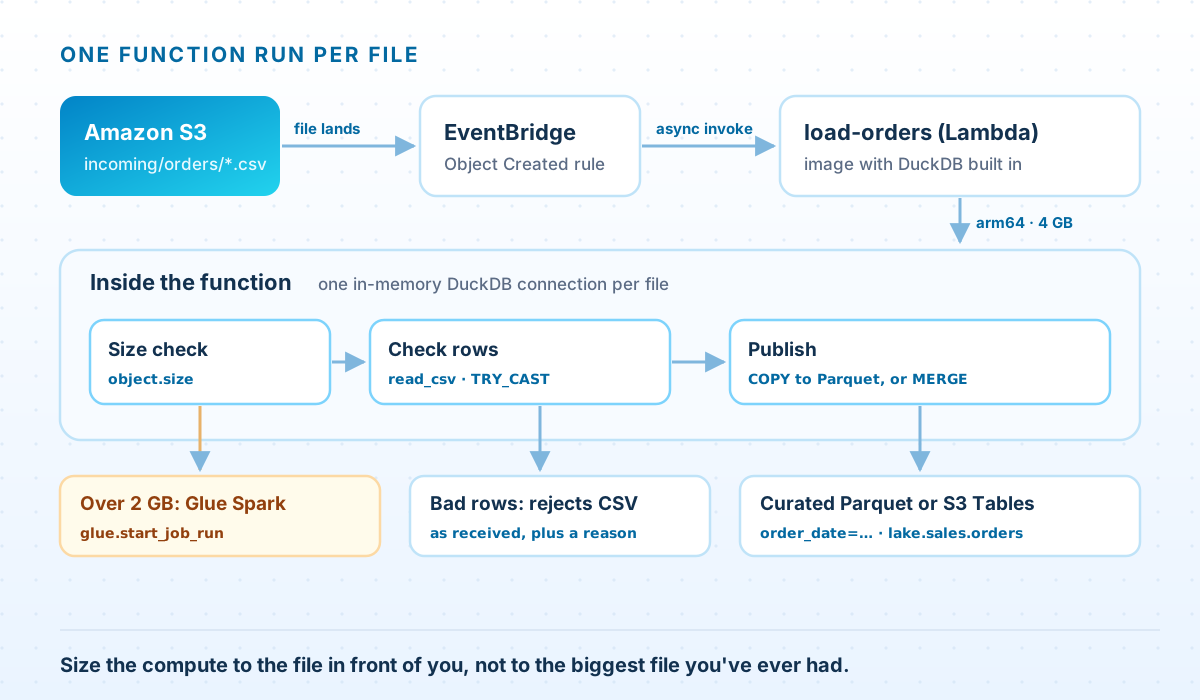
Each file that lands under incoming/orders/ triggers one function run, through the same EventBridge rule pattern as in our file-share article. If partners send a batch of files with a completion marker, trigger on the marker instead and loop over the batch. The function does three things:
- Checks the size. The S3 event says how big the file is. Anything over 2 GB goes to a Glue Spark job, so the function never starts work it can't finish in 15 minutes.
- Checks every row. It reads the file as text and type-checks each value. Rows that fail go to a rejects file with a reason, so one bad amount doesn't fail the whole file at 2am.
- Publishes. It writes good rows as Parquet, one folder per order date, keeping only the latest version of each order. Or it merges them into an Iceberg table, covered below.
The container image
DuckDB's features live in extensions: httpfs for S3, aws for credentials, iceberg for tables. By default DuckDB downloads them the first time a query needs one. In Lambda that's slow, it fails in a VPC without internet access, and it means your production code changes whenever a new extension build is published. Install them when you build the image instead:
Dockerfile — DuckDB with its extensions installed at build time
# Dockerfile: build with --platform linux/arm64, so the extensions below are the Linux arm64 builds.
FROM public.ecr.aws/lambda/python:3.13

RUN pip install --no-cache-dir duckdb==2.0.0

# Install extensions now, into a folder in the image, so the function never downloads
# anything at run time. iceberg needs avro too, and doesn't install it for you.
RUN python3 -c "import duckdb; \
con = duckdb.connect(config={'extension_directories': ['/opt/duckdb/extensions']}); \
[con.install_extension(e) for e in ('httpfs', 'aws', 'avro', 'iceberg')]"

COPY handler.py ${LAMBDA_TASK_ROOT}
CMD ["handler.handler"]
A container image, rather than a .zip file, because DuckDB and these four extensions come to roughly 180 MB unpacked, most of the 250 MB a .zip package and its layers may hold. An image allows 10 GB. Extensions are built for each platform, so build the image for the architecture the function runs on. We use arm64, which costs 20% less per GB-second than x86. One trap we hit while testing: the iceberg extension depends on avro but doesn't install it. With downloads turned off in the function, Iceberg then fails to load. Install all four extensions explicitly.
The function
Python — load-orders, the Lambda function
# load-orders: a Lambda function (container image, arm64). An EventBridge rule
# invokes it for each partner CSV that lands under incoming/orders/.
import os, re
import boto3
import duckdb

CURATED = os.environ["CURATED_PREFIX"]        # s3://example-curated/orders
REJECTS = os.environ["REJECTS_PREFIX"]        # s3://example-curated/rejects/orders
BIG_FILE_JOB = os.environ["BIG_FILE_JOB"]     # the Glue Spark job that takes large files
MAX_BYTES = 2 * 1024**3                       # above this, Lambda is the wrong tool
MEMORY_MB = int(os.environ["AWS_LAMBDA_FUNCTION_MEMORY_SIZE"])

glue = boto3.client("glue")

def connect() -> duckdb.DuckDBPyConnection:
    con = duckdb.connect(config={
        "extension_directories": ["/opt/duckdb/extensions"],  # installed when the image was built
        "autoinstall_known_extensions": False,                # never download at run time
        "home_directory": "/tmp",                             # the rest of the file system is read-only
        "temp_directory": "/tmp/duckdb_spill",                # spill here when memory runs short
        "memory_limit": f"{MEMORY_MB * 3 // 4}MB",            # leave room for Python itself
    })
    con.execute("LOAD httpfs; LOAD aws;")
    # The function role's credentials, from the environment variables Lambda sets.
    con.execute("CREATE OR REPLACE SECRET role (TYPE s3, PROVIDER credential_chain, CHAIN 'env')")
    return con

def handler(event, context):
    bucket = event["detail"]["bucket"]["name"]
    obj = event["detail"]["object"]
    source = f"s3://{bucket}/{obj['key']}"

    if obj["size"] > MAX_BYTES:
        run = glue.start_job_run(JobName=BIG_FILE_JOB, Arguments={"--source": source})
        return {"source": source, "handed_to_glue": run["JobRunId"]}

    # Output names come from the input name, so a rerun overwrites its own output.
    batch = re.sub(r"[^A-Za-z0-9_-]", "_", obj["key"].rsplit("/", 1)[-1].removesuffix(".csv"))
    with connect() as con:
        rejected = check(con, source, batch)
        loaded = publish(con, batch)
    return {"source": source, "loaded": loaded, "rejected": rejected}

def check(con: duckdb.DuckDBPyConnection, source: str, batch: str) -> int:
    # Read every column as text, so a bad value becomes a rejected row, not a failed run.
    con.execute("""
        CREATE TEMP TABLE checked AS
        WITH raw AS (FROM read_csv($src, header = true, all_varchar = true)),
        typed AS (
            SELECT *,
                   TRY_CAST(order_ts AS TIMESTAMP)     AS ts,
                   TRY_CAST(amount AS DECIMAL(12, 2))  AS amt,
                   upper(trim(currency))               AS ccy
            FROM raw
        )
        SELECT *,
               CASE
                   WHEN coalesce(trim(order_id), '') = '' THEN 'missing order_id'
                   WHEN ts IS NULL                         THEN 'bad order_ts'
                   WHEN amt IS NULL                        THEN 'bad amount'
                   WHEN ccy NOT IN ('USD', 'EUR', 'GBP')   THEN 'unknown currency'
               END AS reject_reason
        FROM typed
    """, {"src": source})

    rejected = con.execute("SELECT count(*) FROM checked WHERE reject_reason IS NOT NULL").fetchone()[0]
    if rejected:
        # Each rejected row as it arrived, plus the reason, for the data owner.
        con.execute(f"""
            COPY (SELECT * EXCLUDE (ts, amt, ccy) FROM checked WHERE reject_reason IS NOT NULL)
            TO '{REJECTS}/{batch}.csv' (HEADER)
        """)
    return rejected

def publish(con: duckdb.DuckDBPyConnection, batch: str) -> int:
    # The latest version of each order in this file, typed, one folder per order date.
    return con.execute(f"""
        COPY (
            SELECT trim(order_id) AS order_id, ts AS order_ts, trim(customer_id) AS customer_id,
                   amt AS amount, ccy AS currency, CAST(ts AS DATE) AS order_date
            FROM checked
            WHERE reject_reason IS NULL
            QUALIFY row_number() OVER (PARTITION BY trim(order_id) ORDER BY ts DESC) = 1
        ) TO '{CURATED}' (
            FORMAT parquet, COMPRESSION zstd,
            PARTITION_BY (order_date), FILENAME_PATTERN '{batch}_{{i}}',
            OVERWRITE_OR_IGNORE true
        )
    """).fetchone()[0]
The settings in connect() are what make DuckDB behave in Lambda:
extension_directoriesandautoinstall_known_extensionsload the extensions installed in the image and stop DuckDB downloading anything. In DuckDB 2.0 the setting isextension_directories, a list. The oldextension_directorystill works but logs a deprecation warning.home_directoryandtemp_directorypoint at/tmp, the only writable path in Lambda. With an in-memory database, DuckDB spills to.tmpin the working directory by default, which in Lambda is read-only, so a query that needs to spill would fail.memory_limitis set from the memory the function actually has, which Lambda provides inAWS_LAMBDA_FUNCTION_MEMORY_SIZE. Three quarters leaves room for Python, boto3 and the results you hold.- The secret uses the function role's temporary credentials, which Lambda puts in environment variables. No keys in code or configuration.
The SQL does the rest. Reading everything with all_varchar and converting with TRY_CAST means a value that won't convert becomes a NULL you can explain, not an exception that loses the file. QUALIFY keeps the latest version of each order within the file. And the output file names come from the input file name, with OVERWRITE_OR_IGNORE, so a retry or a rerun replaces its own output rather than adding a second copy. Readers need to treat order_date as a partition: Athena with partition projection, or hive_partitioning in DuckDB.
The Parquet output only removes duplicates within a file. If the same order can arrive in two files on different days, either remove duplicates when reading, or write to an Iceberg table and let a merge handle it.
Testing it on a laptop
This is where the pattern most clearly beats Spark. The same SQL runs against local files, so a test needs no AWS account, no cluster and no Glue container image:
Python — a pytest test for the SQL
# test_load_orders.py: the function's SQL against local files, no AWS needed.
import os
os.environ.update(CURATED_PREFIX="unused", REJECTS_PREFIX="unused", BIG_FILE_JOB="unused",
                  AWS_LAMBDA_FUNCTION_MEMORY_SIZE="4096", AWS_DEFAULT_REGION="us-east-1")
import duckdb
import handler

def test_rejects_bad_rows_and_keeps_latest_version(tmp_path, monkeypatch):
    src = tmp_path / "orders-0412.csv"
    src.write_text("order_id,order_ts,customer_id,amount,currency\n"
                   "A1,2026-11-04 09:00:00,C1,10.50,usd\n"
                   "A1,2026-11-05 08:00:00,C1,12.00,USD\n"
                   "A2,2026-11-05 09:00:00,C2,abc,USD\n")
    (tmp_path / "rejects").mkdir()
    monkeypatch.setattr(handler, "CURATED", str(tmp_path / "orders"))
    monkeypatch.setattr(handler, "REJECTS", str(tmp_path / "rejects"))

    with duckdb.connect() as con:
        assert handler.check(con, str(src), "orders-0412") == 1
        assert handler.publish(con, "orders-0412") == 1

    rows = duckdb.sql(f"FROM read_parquet('{tmp_path}/orders/*/*.parquet', hive_partitioning = true)").fetchall()
    assert [(r[0], str(r[3]), r[4], str(r[5])) for r in rows] == [("A1", "12.00", "USD", "2026-11-05")]
    assert "bad amount" in (tmp_path / "rejects" / "orders-0412.csv").read_text()
It runs in a fraction of a second, so it can run on every commit. Add a fixture for each kind of bad file a partner has ever sent you, and the tests become the record of what the pipeline has to survive. That's much harder to keep up with Glue jobs, which is part of why so few of them are tested; our Glue article covers what that takes.
Deploying it
Build, create the function, and catch failures
# Build for arm64 and push. --provenance=false keeps the image manifest in a format Lambda accepts.
docker buildx build --platform linux/arm64 --provenance=false \
  -t 111122223333.dkr.ecr.us-east-1.amazonaws.com/load-orders:2026-11-05 --push .

aws lambda create-function --function-name load-orders \
  --package-type Image --architectures arm64 \
  --code ImageUri=111122223333.dkr.ecr.us-east-1.amazonaws.com/load-orders:2026-11-05 \
  --role arn:aws:iam::111122223333:role/load-orders \
  --memory-size 4096 --ephemeral-storage Size=4096 --timeout 900 \
  --environment "Variables={CURATED_PREFIX=s3://example-curated/orders,REJECTS_PREFIX=s3://example-curated/rejects/orders,BIG_FILE_JOB=load-orders-spark}"

# A file that still fails after Lambda's two retries goes to a queue someone watches.
aws lambda put-function-event-invoke-config --function-name load-orders \
  --maximum-retry-attempts 2 \
  --destination-config '{"OnFailure": {"Destination": "arn:aws:sqs:us-east-1:111122223333:load-orders-failed"}}'
EventBridge invokes the function asynchronously. If a run fails, Lambda tries it twice more, then sends the event to the failure destination with the error, ready to replay once the file is fixed. Because a rerun overwrites its own output, replaying an event is always safe. The function's role needs to read the incoming prefix, write the curated and rejects prefixes, and start the Glue job.
The 4 GB of /tmp set by --ephemeral-storage is room for DuckDB to spill. You only pay extra for /tmp above the free 512 MB, and the charge is tiny.
Writing to Iceberg instead
Parquet files in folders are fine for data that only ever arrives. If orders change after they first arrive, or the same order turns up in two files, you want a table that can update rows, and that's Apache Iceberg. Our Iceberg CDC article does this with Spark at scale. For small, frequent files, DuckDB 2.0 can do it from the same function.
We use Amazon S3 Tables, S3's managed Iceberg tables, because it runs compaction and snapshot cleanup itself. Many small commits from a Lambda function are exactly the kind of table that needs that maintenance, and this way nobody has to schedule it. Create the namespace and table once:
SQL — create the S3 Tables table, once
-- Run once, from a laptop or a deployment job, not from the function.
INSTALL httpfs; INSTALL aws; INSTALL iceberg;
CREATE SECRET (TYPE s3, PROVIDER credential_chain);

ATTACH 'arn:aws:s3tables:us-east-1:111122223333:bucket/example-lake' AS lake (
    TYPE iceberg, ENDPOINT_TYPE s3_tables
);

CREATE SCHEMA lake.sales;
CREATE TABLE lake.sales.orders (
    order_id VARCHAR, order_ts TIMESTAMP, customer_id VARCHAR,
    amount DECIMAL(12, 2), currency VARCHAR, source_batch VARCHAR
)
PARTITIONED BY (day(order_ts));
Then swap publish() for a merge. Add TABLE_BUCKET_ARN to the function's environment and the S3 Tables permissions to its role:
Python — publish() as a MERGE into S3 Tables
# The Iceberg version of publish(): one MERGE into an S3 Tables table, instead of
# Parquet files. Duplicates across files are resolved here, not by readers.
TABLE_BUCKET = os.environ["TABLE_BUCKET_ARN"]  # arn:aws:s3tables:us-east-1:111122223333:bucket/example-lake

def publish(con: duckdb.DuckDBPyConnection, batch: str) -> int:
    con.execute("LOAD iceberg")
    con.execute(f"ATTACH '{TABLE_BUCKET}' AS lake (TYPE iceberg, ENDPOINT_TYPE s3_tables)")
    return con.execute("""
        MERGE INTO lake.sales.orders AS t
        USING (
            SELECT trim(order_id) AS order_id, ts AS order_ts, trim(customer_id) AS customer_id,
                   amt AS amount, ccy AS currency, $batch AS source_batch
            FROM checked
            WHERE reject_reason IS NULL
            QUALIFY row_number() OVER (PARTITION BY trim(order_id) ORDER BY ts DESC) = 1
        ) AS s
        ON t.order_id = s.order_id
        WHEN MATCHED AND s.order_ts > t.order_ts THEN UPDATE
        WHEN NOT MATCHED THEN INSERT
    """, {"batch": batch}).fetchone()[0]
The merge only replaces an order with a newer version of itself. A rerun of the same file changes nothing, and a file that arrives late with older data doesn't overwrite newer rows. We tested that logic in DuckDB against a local stand-in for the table; run it against a test table bucket before production.
One rule applies here that the Parquet version doesn't need. Only one function run should commit to the table at a time. Iceberg commits are optimistic, so two runs that merge at once conflict, and one of them fails and has to retry. Set the function's reserved concurrency to one:
# One Iceberg commit at a time. Events that arrive meanwhile wait in Lambda's queue.
aws lambda put-function-concurrency --function-name load-orders \
  --reserved-concurrent-executions 1
Events that arrive while a run is in progress aren't lost. For asynchronous invocations, Lambda keeps throttled events in its queue and retries them for up to six hours, so files load one after another in seconds. If one at a time can't keep up with your files, the table has outgrown this pattern.
Memory, disk and the 15-minute limit
- Memory: up to 10,240 MB. CPU scales with memory: one vCPU at 1,769 MB, so 4 GB gives a little over two. A CSV can take more memory than its size on disk once it's read and typed, so watch the
Max Memory Usedfigure in each run'sREPORTlog line and size from that. /tmp: up to 10,240 MB, for spilling. A query that spills is slower but still finishes. One that runs out of/tmpfails.- 15 minutes per run. This is the real ceiling, which is why the function checks the file size before it starts. Pick the threshold from your own runs: start lower than you think and raise it as the
REPORTlines give you evidence. - Network: 625 Mbps per execution environment by default. For a few hundred megabytes that's seconds. For many gigabytes, it's a sign you've reached Spark territory.
If a job needs more than 15 minutes but still fits on one machine, the same image runs on ECS with Fargate, with no time limit. The cheaper fix is often to split the work: one function run per partition or per file instead of one per day. And if a file has to wait for others, or for a person, before it can load, Lambda durable functions handle the waiting and leave the processing to functions like this one.
What it costs
Take 150 partner files a day, about 50 MB each: 4,500 files a month. Compute only, before any free tier:
| Option (us-east-1) | Assumption per month | Compute estimate |
|---|---|---|
| Lambda + DuckDB, one run per file | 4,500 runs × 4 GB (Arm) × 20 s, at $0.0000133334 per GB-second | about $5 |
| Glue Spark, one run per file | 4,500 runs × 2 DPU × 2 billed minutes = 300 DPU-hours | $132 at $0.44 per DPU-hour; about $92 on Glue 6.0 |
| Glue Spark, one run an hour | 720 runs × 2 DPU × 5 minutes = 120 DPU-hours | $53 at $0.44; about $37 on Glue 6.0, with files up to an hour late |
These are estimates from AWS's published us-east-1 prices. The run times are our own assumptions, not measurements: 20 seconds is a generous budget for a 50 MB file, and two billed minutes is a modest one for a small Glue run. Lambda's free tier, 400,000 GB-seconds a month, would cover the whole first line. S3 requests and storage cost the same either way. The difference that matters isn't the dollars: on Lambda, each file loads seconds after it arrives instead of waiting for the next hourly run.
When Glue is still the answer
We don't move everything. The comparison we use:
| Lambda + DuckDB | Glue Spark job | |
|---|---|---|
| Smallest unit you pay for | The memory you choose (from 128 MB), billed per millisecond | Two workers (2 DPU on G.1X), billed per second while the job runs |
| One run can handle | What fits in 10 GB of memory and 10 GB of /tmp, within 15 minutes | Terabytes, spread across as many workers as you give it |
| Many files at once | One function run per file, side by side, up to your concurrency limit | One job run at a time by default; batch the files |
| You write | SQL, in a Python function you can test on a laptop | PySpark or Spark SQL |
| Built in | Very little: you add retries, failure queues and alerts | Job bookmarks, Glue Data Quality, connectors, Spark UI |
| Iceberg | Insert, update, delete and merge through S3 Tables or the Glue catalog; one writer at a time | The most complete Iceberg support on AWS, including table maintenance procedures |
Keep a job on Glue Spark when:
- One run reads more than a few gigabytes, or joins against a large table. That's what distributed Spark is for, and the 15-minute limit arrives fast.
- It depends on Glue features: job bookmarks, Glue Data Quality rulesets, Glue connectors, or the Spark UI your team debugs with.
- Access is managed in Lake Formation. Glue and Athena enforce table and column permissions. A function reading S3 directly uses its own IAM role and goes around them, so check how DuckDB would get access before you move a governed table.
- Many writers share one Iceberg table at high frequency. Spark on Glue has the most complete Iceberg support on AWS, including the maintenance procedures.
- Your team is fluent in PySpark and the jobs work. Moving working jobs costs more than it saves unless they're small and frequent.
There's a middle path too. AWS published a walkthrough in October 2026 that runs DuckDB inside a Glue job and writes to S3 Tables. You keep Glue's scheduling, workflows and monitoring, and still pay the two-worker minimum. That suits teams whose operations are built around Glue.
In practice we usually end up splitting jobs by size. Small, frequent files from partners, exports and SaaS feeds go to Lambda with DuckDB. Large or wide transformations stay on Glue. When we retire SSIS estates, a surprising share of the packages turn out to belong to the first group.
Questions we get asked
Is DuckDB production-ready for data pipelines?
Yes, for work that fits on one machine. DuckDB 2.0.0, released in October 2026, is a long-term support release supported until at least October 2027. Pin the version in your image, as you would any dependency, and test upgrades before rolling them out. Database files written by 2.0 can't be read by older versions, though that doesn't affect a pipeline that only reads and writes CSV and Parquet.
How big a file can DuckDB handle in Lambda?
It depends on the file and the query more than on a fixed number. A function has up to 10 GB of memory and 10 GB of /tmp to spill into, and 15 minutes. Files up to a few hundred megabytes are comfortable. Check Max Memory Used in each run's REPORT log line, and route anything larger than you've proven to Glue, as the function in this article does.
Why not keep using Glue Python shell jobs?
Python shell jobs run Python 3.9 with libraries from 2022, and AWS now documents how to migrate off them, listing Lambda as an option for jobs under 15 minutes. DuckDB 2.0 needs Python 3.11 or later, so it can't run there. Lambda also starts faster and bills per millisecond.
Can DuckDB write Iceberg tables that Athena and Spark can read?
Yes. DuckDB writes standard Iceberg metadata and commits through a REST catalog, such as Amazon S3 Tables or the Glue Data Catalog's Iceberg endpoint, so Athena, Spark and other engines see the same table. Allow only one writer at a time per table to avoid commit conflicts.
Does DuckDB respect Lake Formation permissions?
Not on its own. A Lambda function reading S3 directly uses its own IAM role, which goes around table and column grants in Lake Formation. For governed tables, keep access through Glue or Athena, or design the function's permissions on purpose.
What does a cold start cost?
The first run in a new execution environment loads Python, DuckDB and its extensions from the image, which adds time to that run only. For file ingestion that delay rarely matters. If it does, provisioned concurrency keeps environments warm, at a cost.
Paying for Spark clusters to move small files?
We'll review your Glue jobs and partner feeds, find the ones that belong on Lambda with DuckDB and the ones that should stay on Spark, and move the first ones with tests and monitoring.
Book a pipeline review